Revizto for small BIM teams: capabilities, pricing, and common alternatives

CEO & Co-founder
Published
Updated
TL;DR
Revizto is one of the most comprehensive platforms for BIM coordination. However, for Revit-based teams of 5-50 people, its advanced functionality can be more than they need for daily workflows. Also, combined with Revizto’s relatively high pricing and complex licensing model, this can lead teams to look for alternatives. In this guide, we explore when it makes sense to keep using Revizto and when an alternative may be a better fit. We compare six Revizto alternatives: Pinly, Autodesk Issues, BIMcollab, Dalux BIM Viewer, Bluebeam Revu, and custom Revit workflows using pyRevit, Dynamo, or MCP solutions.
What is Revizto and who can benefit from it most
Revizto is one of the most comprehensive platforms for BIM coordination. The tool is particularly relevant to large AEC teams, general contractors, multidisciplinary projects and projects where some participants work outside Revit.
The main capabilities and features of Revizto include:
- Issue tracking software for creating, assigning, discussing, filtering, and resolving coordination issues
- Automated clash detection and coordination workflows
- 2D and 3D model review and markup in the same environment
- A shared workspace for models, issues, markups, and coordination information
- Revit integration, including model publishing and switching between Revit and Revizto
- Integrations with Navisworks, IFC, ACC/BIM 360 and other BIM tools
- Mobile access for reviewing models and issues on phones and tablets
- VR and AR capabilities for model review and field-oriented workflows
- Support for participants who do not work directly in Revit
Why are small teams looking at Revizto alternatives?
Revizto is a mature and feature-rich coordination platform and current users continue to highlight its broad set of capabilities.
Still, smaller teams may start exploring alternatives because of pricing pressure, the complexity of its licensing models, or the gap between Revizto and the Revit workflow.
1. Pricing pressure
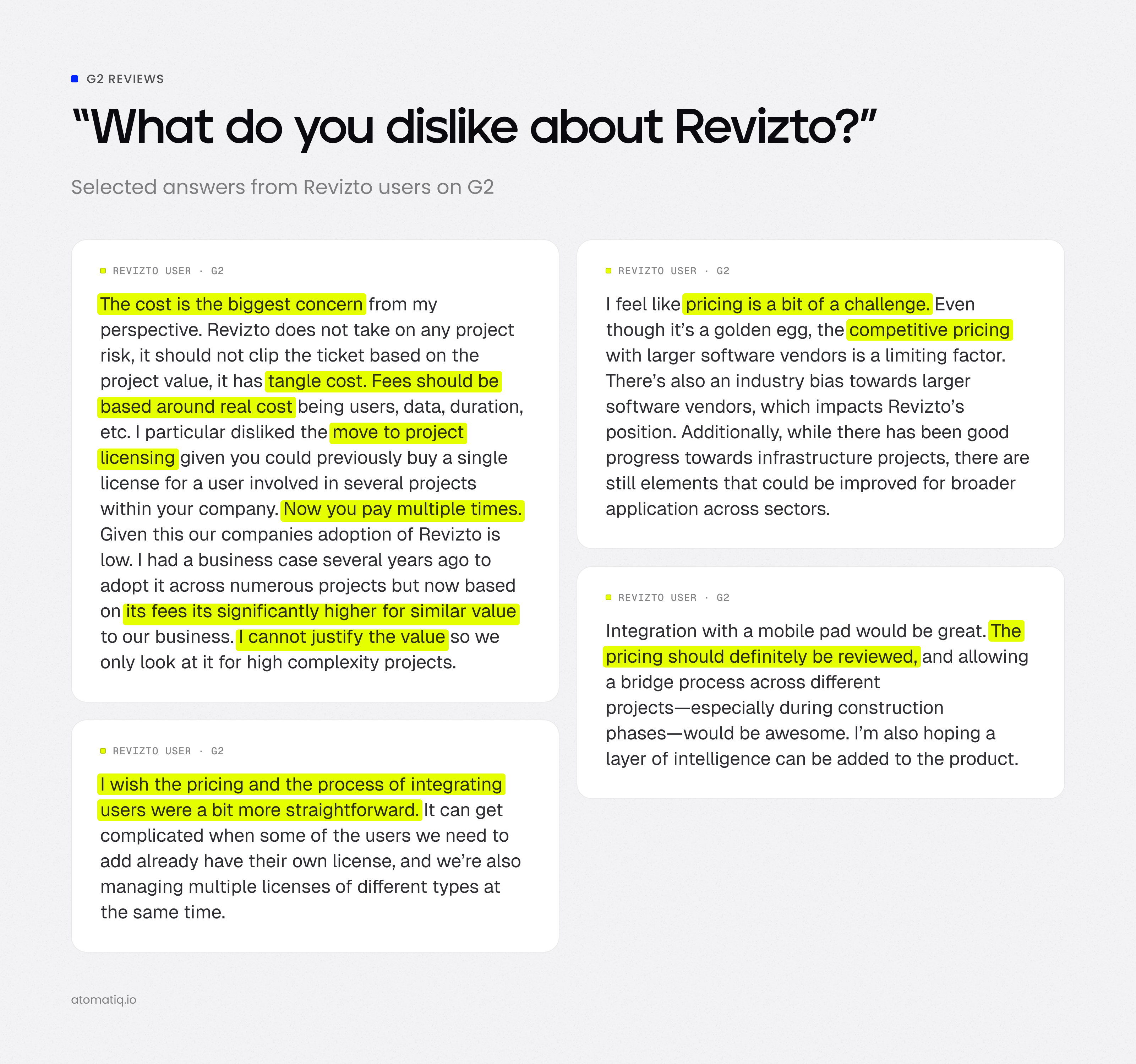
The first issue is Revizto pricing. On G2, for instance, many Revizto users point to pricing as one of the things they dislike about the product.
Revizto currently offers three commercial models: per-user licensing for growing teams, per-project licensing for project delivery, and usage-based enterprise licensing. The problem for many users is that the public pricing page does not provide numerical prices, so a company has to contact Revizto to determine its actual Revizto price and Revizto license cost.
There is also no free plan or free trial listed in Revizto’s current pricing information, which can make it harder for a small team to evaluate the platform before committing to a paid license.
2. Confusing per-user and per-project licensing
The distinction between per-user and per-project licensing can be confusing for smaller teams. The topic has even become the subject of a separate discussion in the r/ReviztoUsers subreddit.
To make the difference clearer, here’s how the two licensing models work.
- With per-user licensing, the license is tied to the people using Revizto, so the same team members can use the platform across multiple projects.
- With per-project licensing, the cost is tied to a specific project, with pricing based on factors such as project value.
For a small company working on many smaller jobs, this can make it indeed harder to know if an existing license covers a new project or if an additional project-specific fee will apply.
3. Limited coordination inside Revit
Another point to consider is the gap between coordination and the Revit model.
Revizto creates clashes and issues in its shared cloud environment but the workflow inside Revit is more limited. From Revit, users can switch the camera to the relevant location and select the corresponding model element through the switchback workflow. They can also create a Revizto issue from Revit but replying to and discussing issues still requires working in Revizto. This means that coordination discussions may require users to move between the Revit model and the Revizto environment.
When Revizto still makes sense
Despite the considerations above, there are still scenarios where Revizto can be a good fit. Let’s look at where Revizto still makes sense.
1. Large multidisciplinary projects with external participants
Revizto is a good fit when several disciplines need to coordinate models and the project includes contractors, subcontractors, field teams, owners or other participants outside the core Revit team.
The core benefit here is a shared coordination environment where different project participants can review models, access issues, add comments, and follow coordination work without working directly in the same Revit authoring environment.
2. Projects that need full clash detection
Some projects require full clash detection combined with a single environment for reviewing both 2D drawings and 3D models and Revizto is a smart choice here, too. The tool supports automated clash detection as well as issue management and 2D/3D review.
This is particularly useful when clashes are detected across multiple models and then need to be assigned, discussed, tracked, and resolved as part of the same coordination process.
3. Teams already working across connected Autodesk workflows
Revizto can also make sense for teams that already have an established Autodesk-based coordination environment and need a dedicated platform for broader project coordination.
In these workflows, coordination can still run through ACC/BIM 360, with Revizto providing an additional environment for model review, clash detection and issue management.
Aspects to consider when choosing a Revizto alternative for a small team
If a team decides to look for a Revizto alternative, there are a few practical parameters worth considering before choosing a new tool.
- Budget – look for transparent pricing per seat without requiring the whole team to be licensed. This makes it easier to match the software cost to the actual number of people on your team using it.
- Ease of use – consider how quickly your specialists can get started. For a small team, onboarding should take days (not weeks or months) and should not require a lengthy implementation process or calls with a dedicated onboarding team.
- Comment location – check where comments and issues are attached: to a PDF sheet, stored in the cloud, or linked directly to model elements, as this affects how much design context is preserved when the model is updated.
- BIM integrations – when comparing the best Revit plugins, check how well each option fits into your existing BIM workflow. Revit support should usually be a priority for Revit-based teams while IFC and Navisworks integrations can be important when a project involves those formats or tools.
- Process scope – analyze how much of the coordination process the team needs. Some projects require a full workflow with priorities, issue management, and field coordination. Others, on the other hand, may only need basic discussion threads with statuses attached to model elements.
Quick comparison of Revizto alternatives
Before we compare the six Revizto alternatives in greater detail, here’s a quick overview of how Revizto compares with each tool.
| Tool | Comment location | Real-time sync | AI / automation | Pricing 2026 |
|---|---|---|---|---|
| Revizto | Cloud; 2D sheets and 3D models in single environment | Yes | Provides an MCP server for custom AI/LLM integration | Quote-based (3 custom tiers) |
| Pinly | Directly on model elements inside Revit | Yes, via WebSockets | Open MCP server (create, reply, batch-resolve via AI) | Free for 1 seat and 3 active projects; $10/seat/mo for Pro; Custom for Enterprise |
| Autodesk Issues | Cloud; issues on 3D objects via Revit Issues Add-in & 2D sheets | Yes, within Autodesk ecosystem | Autodesk AI features (automated issue reporting and grouping) | Quote-based |
| BIMcollab | Cloud & BIM plugins via BCF | Yes | No | From ~$14/user/mo for Basic, ~$21 for Advanced, ~$28 for Enterprise (billed annually; min 10 seats) |
| Dalux BIM Viewer | Cloud, BIM viewer | Yes | No | Free (limited to 3 active projects/buildings; unlimited users) |
| Bluebeam Revu | Directly on 2D PDF drawings and markups | Yes (via Studio Sessions) | Automated markup tracking and session activity reporting | $260/user/yr (Basics), $330 (Core), $440 (Complete), $590 (Max) |
| pyRevit, Dynamo and custom MCP | Depends on team implementation | Depends on custom script | Custom AI via MCP scripts, visual programming and automation | Free software core; initial custom dev: $30-150k + 15-25%/yr maintenance |
6 best Revizto alternatives for small teams
Below, we’ll look at the six Revizto alternatives and the specific coordination needs each one can address.
Commenting and coordination directly inside Revit
For teams that want to keep comments and design coordination inside Revit, there are options that don't require a separate coordination platform. Pinly fits this workflow when models are managed outside Forma Data Management. Autodesk Issues can serve a similar role when the project already uses the Autodesk environment.
1. Pinly
Pinly is a Revit-native collaboration plugin for teams that need lightweight design discussions and issue tracking directly in Revit. Comments and threaded discussions stay attached to specific Revit elements, with mentions and issue statuses helping teams follow design feedback.
Its Collaboration Hub makes project feedback accessible outside Revit, and MCP tokens allow external LLMs and AI assistants to work with comment and issue data.
Pros
- Minimal onboarding for Revit users
- Feedback stays close to the design context
- Low-cost entry for small teams
Cons
- Revit-only support, with no compatibility with other CAD or BIM tools
- Comment history stored in Pinly’s cloud rather than inside the .rvt file
- No comment export options or BCF support
Pricing: highly accessible entry point (free tier for 1 seat and up to 3 active projects; Pro at $10/seat/month; Enterprise custom pricing)
Best for: teams that need lightweight Revit collaboration and want design discussions to be tied directly to model elements without adopting a full CDE.
2. Autodesk Issues
Autodesk Issues provides issue management within the Autodesk project environment, with issues pinned to 2D sheets or 3D models and connected to forms, RFIs, documents, and other project information. The tool supports custom issue fields, reporting, and mobile issue management, including offline access for field teams.
Pros
- One issue workflow across design and construction
- Strong connection with RFIs, forms, and other project data
- Structured reporting for project managers
Cons
- Strong dependence on the Autodesk ecosystem
- Less suited to lightweight day-to-day design discussions
Pricing: quote-based
Best for: teams already working in the Autodesk ecosystem that need structured issue management across design, construction and field workflows.
Open standards for issue exchange without changing the CDE
Projects involving several BIM applications can benefit from open issue exchange. BIMcollab supports this workflow through the BCF standard.
3. BIMcollab
BIMcollab is an openBIM issue-management platform that is built around the BCF standard. It enables teams to exchange model-based issues between Revit, Navisworks, Archicad, Tekla, and other BIM tools, all while keeping coordination information connected to the existing CDE.
Pros
- OpenBIM interoperability across authoring tools
- Centralized issue history and audit trail
- Flexible workflows with custom fields and approvals
Cons
- 10-user minimum for issue-management plans
- Advanced model checking requires a separate Zoom subscription
- More setup than a lightweight Revit collaboration tool
Pricing: basic plan from ~$14/user/month when billed annually, with a 10-user minimum to get started; advanced from ~$21/user/month and Enterprise from ~$28/user/month
Best for: BIM teams that want open standards for issue exchange without changing their existing CDE or BIM authoring tools, particularly when a project involves multiple BIM platforms
Free project-wide BIM access
For smaller projects, broad access to shared models and drawings can be more important than advanced coordination features or individual user licenses, and Dalux BIM Viewer is designed exactly around this need.
4. Dalux BIM Viewer
Dalux BIM Viewer provides free project-wide access to native BIM, IFC models, and drawings. The solution supports 2D/3D viewing, measurements, model filtering, comments, and integrations with Revit, Navisworks, Tekla, and Archicad, which makes it a practical option when the main goal is to give the whole project team access to shared BIM information.
Pros
- Free access for the whole project team
- Low hardware and software barrier for model review
- Easy sharing across disciplines and devices
Cons
- Limited coordination features in the free viewer
- Advanced workflows require paid Dalux products
- Three-project limit for free use
Pricing: free (note: free use is limited to 3 different and active projects or buildings)
Best for: teams that need free project-wide BIM access for multiple stakeholders, especially when model viewing, basic comments, and mobile access are more important than a full-featured coordination workflow.
Full coordination without changing PDF-based habits
If plans, markups and tender documents remain central to coordination, a PDF-based tool may be a practical fit. Bluebeam Revu is one option for this type of workflow.
5. Bluebeam Revu
Bluebeam Revu is a PDF-first collaboration and review tool that lets teams keep their existing drawing-based workflow while adding real-time collaboration through Studio. With this solution, teams can mark up the same PDFs, add comments and statuses, track activity, and generate reports without moving their review process into a model-based coordination platform.
Note: If your team is still using Revu 20, keep in mind that it reaches end of life on December 31, 2026. We recently covered what this means for existing users and explored Bluebeam Revu alternatives in our blog.
Pros
- Familiar PDF-based review process
- Strong document revision history
- Easy participation for external reviewers
Cons
- No model-element-based issue tracking
- Limited BIM coordination capabilities
- Revu 20 reaches end of life on December 31, 2026
Pricing: from $260/user/year for Basics, $330 for Core, $440 for Complete, and $590 for Max
Best for: teams that want full drawing review and collaboration without changing their PDF-based habits, particularly when most coordination happens through plans, markups, comments, and document revisions.
Custom Revit workflows
Teams with a professional developer can build custom Revit automation when their requirements do not fit a ready-made coordination workflow. pyRevit, Dynamo, and custom MCP solutions can support this approach, yet development, deployment, and ongoing maintenance all need to be factored into the cost.
6. pyRevit, Dynamo and custom MCP solutions
pyRevit, Dynamo and custom MCP solutions take a different approach to Revizto alternatives: they allow teams to build automation directly around Revit and its data.
pyRevit provides tools and development capabilities inside Revit, Dynamo provides visual programming for Revit workflows, and MCP can connect AI assistants to Revit and related project data.
Pros
- Automation built around firm-specific processes
- Freedom to extend Revit beyond standard workflows
- No recurring coordination-platform dependency
Cons
- Technical knowledge required for development and maintenance
- Ongoing maintenance across Revit versions
- Development and maintenance costs for custom solutions
Pricing: pyRevit and Dynamo are available at no additional software cost. Custom Revit add-ins typically require a development budget; based on our internal research, initial development can cost $30,000-150,000, with ongoing support adding 15-25% per year.
Best for: teams with a developer and highly specific custom Revit workflows that need automation built around their own standards and processes.
Revizto vs Pinly: how the two tools differ
Now that we’ve compared the six Revizto alternatives, let’s zero in on Revizto and Pinly.
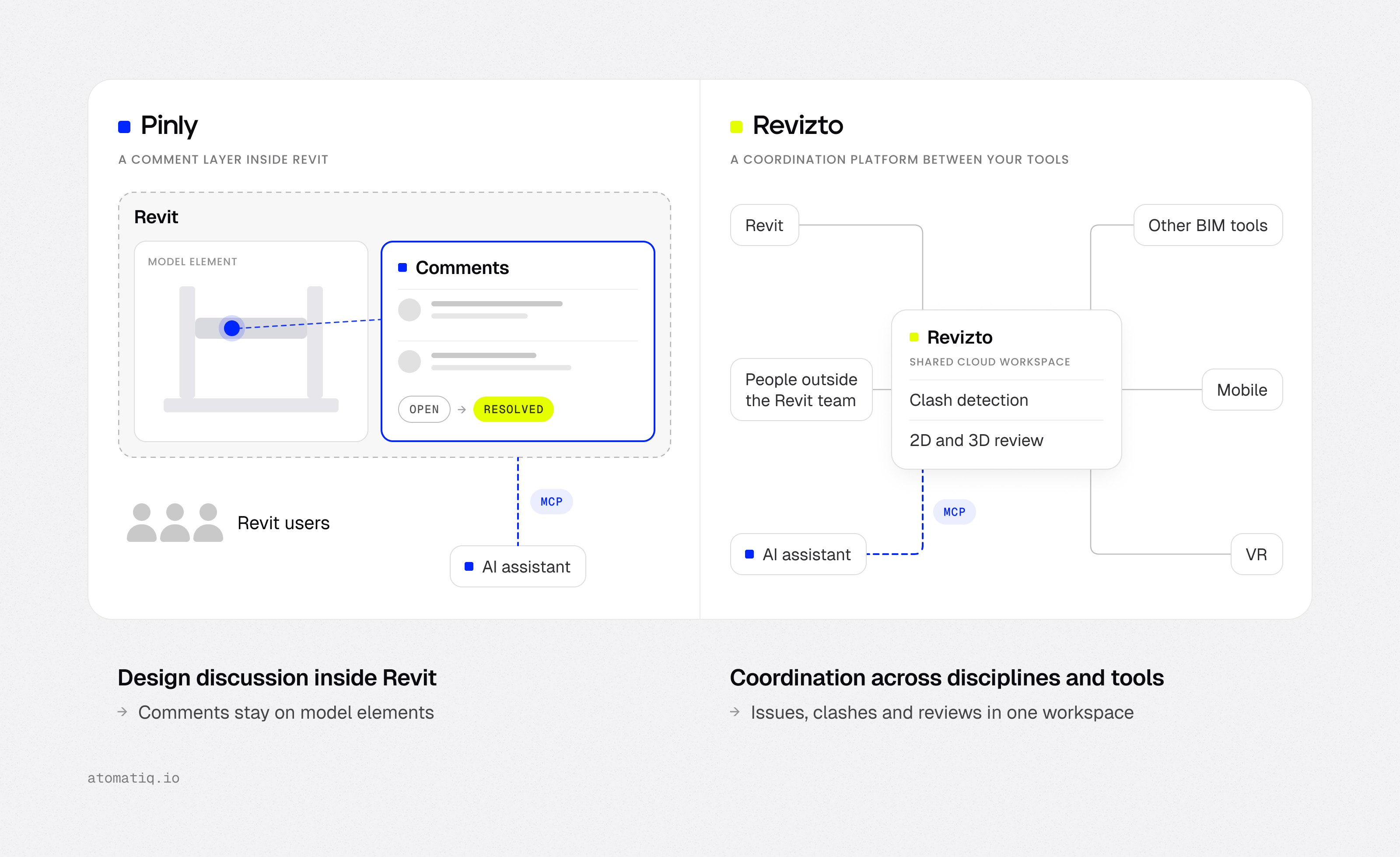
Revizto and Pinly address some of the same coordination needs, yet they are meant for different levels of workflow.
If the main task is to quickly leave comments on specific model elements, discuss them with other Revit users, assign statuses, and resolve design feedback within the Revit workflow, Pinly focuses on that use case. Comments appear in a Revit side panel and remain associated with model elements, with no automated clash-detection workflow or broader coordination environment for participants outside the Revit team.
Revizto covers a broader coordination process. The tool supports multidisciplinary model coordination, automated clash detection and reporting, participants outside the Revit team, mobile access, VR, and 2D/3D project review across different BIM applications.
There is also a difference in how the two products approach AI integration. Revizto now provides an MCP Server that connects external AI tools to Revizto project data, which enables users to query project information and perform guided actions through AI assistants. Pinly’s MCP capabilities provide MCP tokens that connect the plugin with external LLMs and AI assistants, with access to comment and issue data.
In short:
- Pinly is a focused option for teams that need model-element comments, threaded discussions, statuses and lightweight coordination within the Revit workflow.
- Revizto is a broader platform for multidisciplinary BIM coordination, automated clash workflows, external project participants, mobile/VR access and 2D/3D review.
Which Revizto alternative makes sense for a small team?
The best fit will depend on your team’s coordination needs and the type of workflow you want to support.
- Stay with Revizto if the project involves several disciplines and participants outside the Revit team, requires automated Revizto clash detection, or depends on field, mobile, 2D/3D, and broader coordination workflows.
- Consider Pinly if your team has 50-500 people, works predominantly in Revit, and primarily needs design comments, threads, assignments, and statuses attached to model elements. The workflow is particularly relevant when the team wants real-time design review inside Revit and doesn't need a broader field platform.
- Autodesk Issues is worth exploring if the project already uses the Autodesk ecosystem and needs structured issue management connected to models, sheets, forms, and RFIs.
- BIMcollab suits teams working across several BIM applications that need open BCF-based issue exchange while keeping their existing CDE.
- Dalux BIM Viewer delivers a practical option when the priority is giving a large number of project participants free access to shared BIM models and drawings, with basic viewing and commenting.
- Bluebeam Revu fits drawing-focused workflows where coordination still centers on plans, markups, and tender documentation.
- A custom workflow with pyRevit, Dynamo, or MCP can make sense for teams with development resources and highly specific Revit automation requirements. Custom development can require a significant upfront investment, so development and ongoing maintenance costs should be part of the calculation.
When comparing different options and Revit collaboration tools, it’s always a good idea to get in touch with the solution provider to see the workflow in action and, where available, testing it on your own projects. A demo or trial can help you assess how well the tool fits your team’s existing workflow before committing to a new platform.
FAQ
How much does Revizto cost for a small team?
Current Revizto pricing is quote-based. Revizto offers per-user, per-project, and enterprise licensing but the public pricing page doesn't list numerical prices.
Also, the tool doesn't currently list a free plan or free trial.
What is the difference between Revizto per-user and per-project licensing?
A per-user license is tied to individual authorized users and can cover multiple projects. A per-project license covers a specific project and allows unlimited users to collaborate on it. This distinction can matter for small teams because the more suitable model depends on whether the team needs access across several projects or broad access to one project.
What can Revizto do directly inside Revit?
Through its native Revit add-in, Revizto allows teams to publish 3D model geometry and 2D sheets to a linked Revizto project, either manually or on a schedule. Users can also create Revizto issues directly from Revit and switch back between Revizto and the corresponding Revit project. The Switchback feature can replicate the current Revizto view in Revit, including the camera position, section, and selected element.
What is the best Revizto alternative for a small team?
The right option depends on the workflow.
- Pinly or built-in Autodesk Issues can cover comments and issue coordination around Revit models
- BIMcollab supports open BCF-based coordination across BIM applications
- Dalux BIM Viewer provides a free way to give project participants access to shared models and drawings
- Bluebeam Revu suits document-centered workflows
- pyRevit, Dynamo, and custom MCP solutions can support teams that need tailored Revit automation
How does AI fit into Revit collaboration?
AI is becoming useful for AI for construction workflows such as reviewing issues, generating reports, checking model data, and handling repetitive coordination tasks.
Pinly, for instance, connects external LLMs and AI assistants to project comments and issues through MCP, while Revizto’s MCP Server provides access to project data such as issues, clashes, models, and reports.
Is Pinly a replacement for Revizto?
The two Revit collaboration tools serve a bit different scopes. Pinly is a focused option for lightweight Revit collaboration, with model-element comments, threaded discussions, statuses, and real-time design review inside Revit.
Revizto covers a broader coordination workflow with multidisciplinary models, clash detection, 2D/3D review, mobile access, and wider project participation
Does Revizto have clash detection?
Yes. Revizto clash detection is part of Revizto’s broader BIM coordination workflow along with issue tracking and model coordination. The current platform also connects coordination data with its broader BIM coordination software and AI capabilities.
CEO & Co-founder
Ilia Ivanov is a BIM and AEC software development expert with over 10 years of experience. He specializes in Autodesk Revit, BIM automation, and custom software development for the AEC industry. Ilia shares practical insights on the Revit API, AI-powered engineering workflows, and building tools that help design teams work more efficiently.