Electrical Pack vs ElectroBIM: Revit electrical design software comparison

Product Lead, Electrical Pack
Published
Updated
TL;DR
Design Master ElectroBIM is a long-established Revit electrical design tool but its relatively high licensing cost has led some engineering teams to look for ElectroBIM alternatives, with Electrical Pack being one of them. In this Revit electrical plugin comparison guide, we compare the two products across their core features, pricing, interface, supported standards, Revit versions, support and other practical aspects.
ElectroBIM vs Electrical Pack at a glance
Before we explore the two products in greater detail, we suggest that you take a look at the table below for a quick side-by-side overview of ElectroBIM and its ElectroBIM alternative for Revit, Electrical Pack.
| Comparison point | ElectroBIM | Electrical Pack |
|---|---|---|
| Pricing | Dedicated license (one named user): $2,500/seat/yr; floating license: $10,000/seat/yr | Subscription: $828/year (or $1,032/year if billed monthly) |
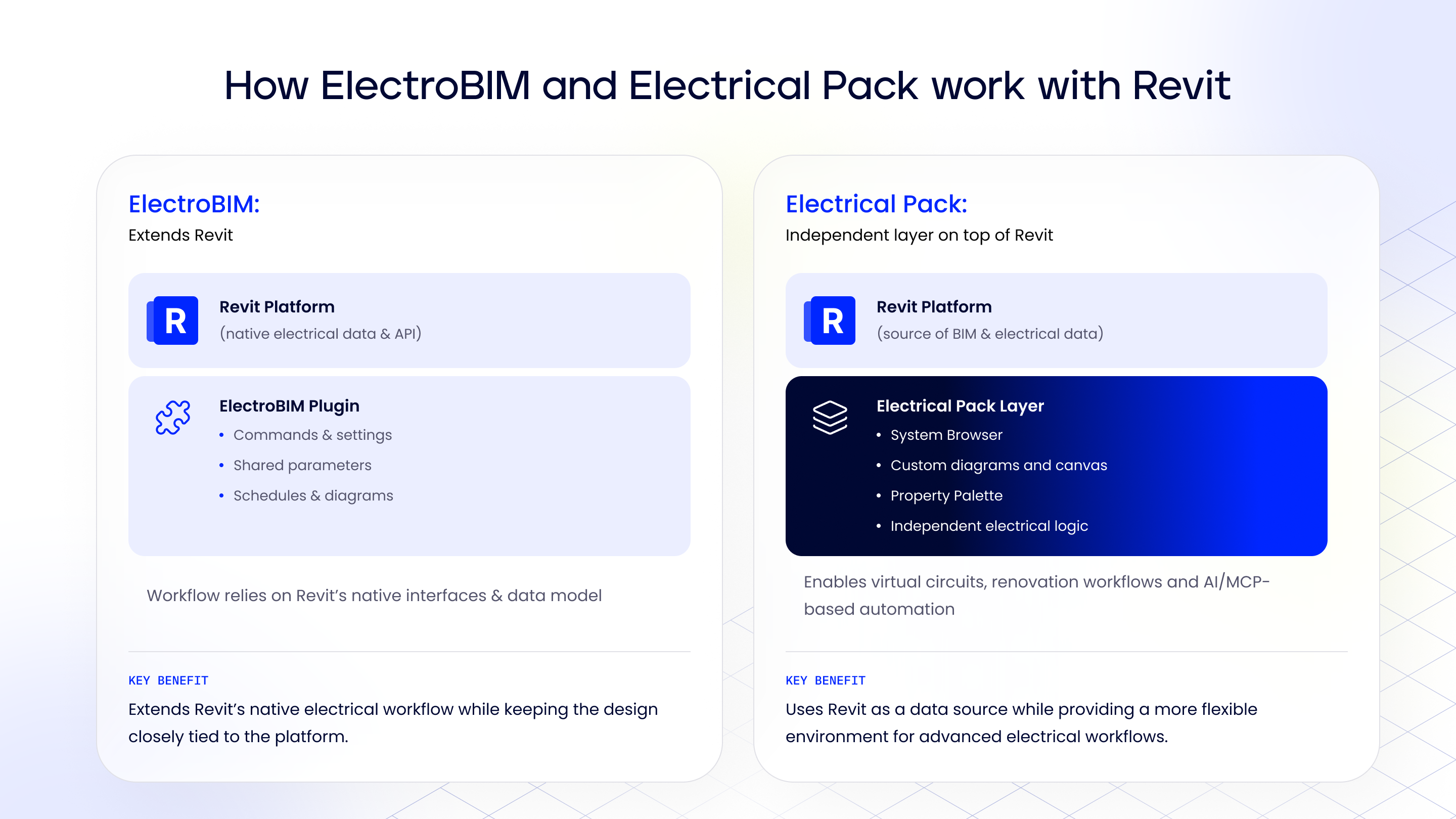
| Product philosophy | Extends native Revit capabilities directly, relying heavily on Revit’s built-in environment and model structures | Operates as an independent layer on top of Revit and uses custom UI (System Browser, canvas) for faster performance and advanced logic |
| Single-line and riser diagrams | Diagram is updated manually by the user with the Update command; link works from the model to the diagram only; dedicated riser view workflows | Generated from the model and updated automatically in the background (manual update only after significant model changes); two-way link between model and diagram; interactive layout converts to Drafting Views |
| Wire sizing | Automated breaker and conductor sizing based on load rules and motor metrics (FLA, MCA, MOCP); supports manual overrides | Automatic wire sizing from the electrical circuit data in the model; manual selection available |
| Voltage drop | Full-path calculation with its own logic for circuit length and distributed load; auto-upsizes conductors when limits are exceeded | Full-path tracking from service panel to load; highlights drops via System Browser; load is currently applied at the end of the circuit |
| Power-system studies | Fault current, arc flash for panels, and breaker time-current curves for selective coordination | Fault-current calculation in final development (expected October 2026); arc flash and time-current curves not available yet |
| Standards | Built for NEC defaults; primary market is North America | Native support for NEC and IEC workflows via custom rulesets; configurable for North America, Europe and other regions that use IEC |
| 3D conduit and openings | Sizes conduit (NEC fill); exports run data to EVOLVE Electrical for detailing | Native Create Conduits 3D routing + Opening Manager for wall/slab penetrations |
| Data workflow | Custom shared parameters, schedules, and dedicated ribbon commands, heavily dependent on Revit’s native interfaces | Own System Browser, Property Palette, project templates and Electrical Settings, independent of Revit’s native interfaces and responding to model changes right away; virtual circuits and loads for renovation projects planned for this year |
| Interface and daily use | Command- and dialog-based workflow; familiar to long-time users | Visual Miro-like canvas for direct element editing within one workspace |
| AI capabilities | MCP Server (v2.9) connects external LLMs to balance circuits and query models | Native engineering automation (diagrams, templates, conduit/opening placement) + MCP-based AI automation |
| Revit version support | 2021-2027 | 2025 through 2027 (legacy versions on request) |
| Support and onboarding | Structured tutorial library, sample Revit project files, embedded videos, and live phone/email/chat support | Product demos, video tutorials, 14-day free trial, plus guided Enterprise onboarding with template configuration |
Why compare Electrical Pack and ElectroBIM?
I serve as the Product Lead for Electrical Pack and I regularly speak with electrical engineers and BIM teams about the challenges they face in their Revit workflows. Over the past few months, one topic has come up more and more often in our conversations: what are the alternatives to ElectroBIM?
There is a straightforward reason for this question. ElectroBIM has become a significant investment for engineering teams. A single-user license currently costs $2,500 per year while a floating license costs $10,000 per seat per year. For a company with several electrical engineers, this can be a substantial expense. That’s why some consider more budget-friendly alternatives that can cover the majority of ElectroBIM’s core workflows, including wire sizing, voltage-drop calculations, single-line diagrams, and electrical data management. And I can say for sure that Electrical Pack can be considered an ElectroBIM competitor for those looking to retain these core workflows with a different pricing model.
Note: Electrical Pack is a newer product and its calculation capabilities are still expanding. It already covers the core workflows discussed in this comparison, while fault-current calculation is currently in final development. Arc-flash calculation and time-current curves for selective coordination are not available yet. If these advanced power-system studies are part of your workflow, keep this difference in mind when comparing the two tools.
In this guide, our team will provide a comprehensive Revit electrical design software comparison between ElectroBIM and Electrical Pack across their main electrical design features, interface, pricing, Revit compatibility, supported standards, support resources, and other factors that can affect the choice of a Revit electrical plugin.
Product philosophy
Electrical BIM takes an approach that extends Revit’s existing capabilities for electrical design. Its functionality is built around the Revit environment and its native way of handling electrical model data.
Electrical Pack follows a different philosophy. It uses Revit as a source of BIM and electrical data but builds a more independent electrical-design environment on top of it, with its own interfaces, diagrams, System Browser, and logic for working with electrical data.
This gives Electrical Pack more freedom to develop workflows beyond Revit’s native capabilities, including virtual circuits and loads for renovation workflows (planned for this year) and deeper AI/MCP integration.
Single-line diagrams
Single-line diagrams are one of the most visible parts of both products. They take electrical information already stored in the Revit model and turn it into a schematic representation of the distribution system.
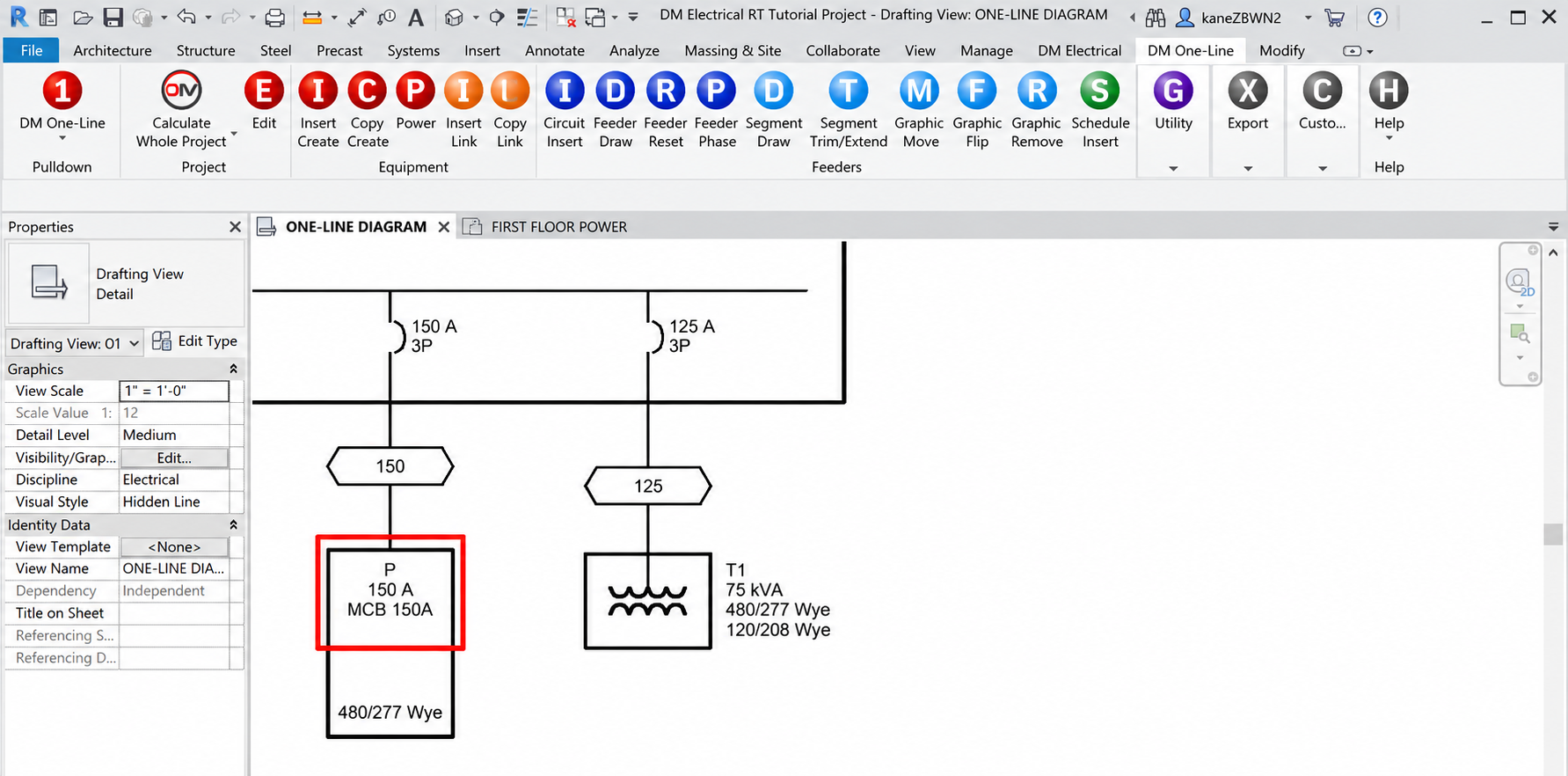
ElectroBIM has supported single-line diagrams in Revit for years and includes a dedicated workflow for one-line riser diagrams. Engineers can generate a riser configuration from a single-line diagram and place part or all of the result into a Revit Drafting View. The product also provides project and family settings for controlling the graphics used in the diagrams.
The important point is that the diagram remains connected to the electrical design data. ElectroBIM’s current product documentation describes single-line diagrams as linked to the Revit model, with labels and connections updating as the design changes. In practice, a diagram update in ElectroBIM is started manually by the user with the Update command, and the link works from the model to the diagram only.
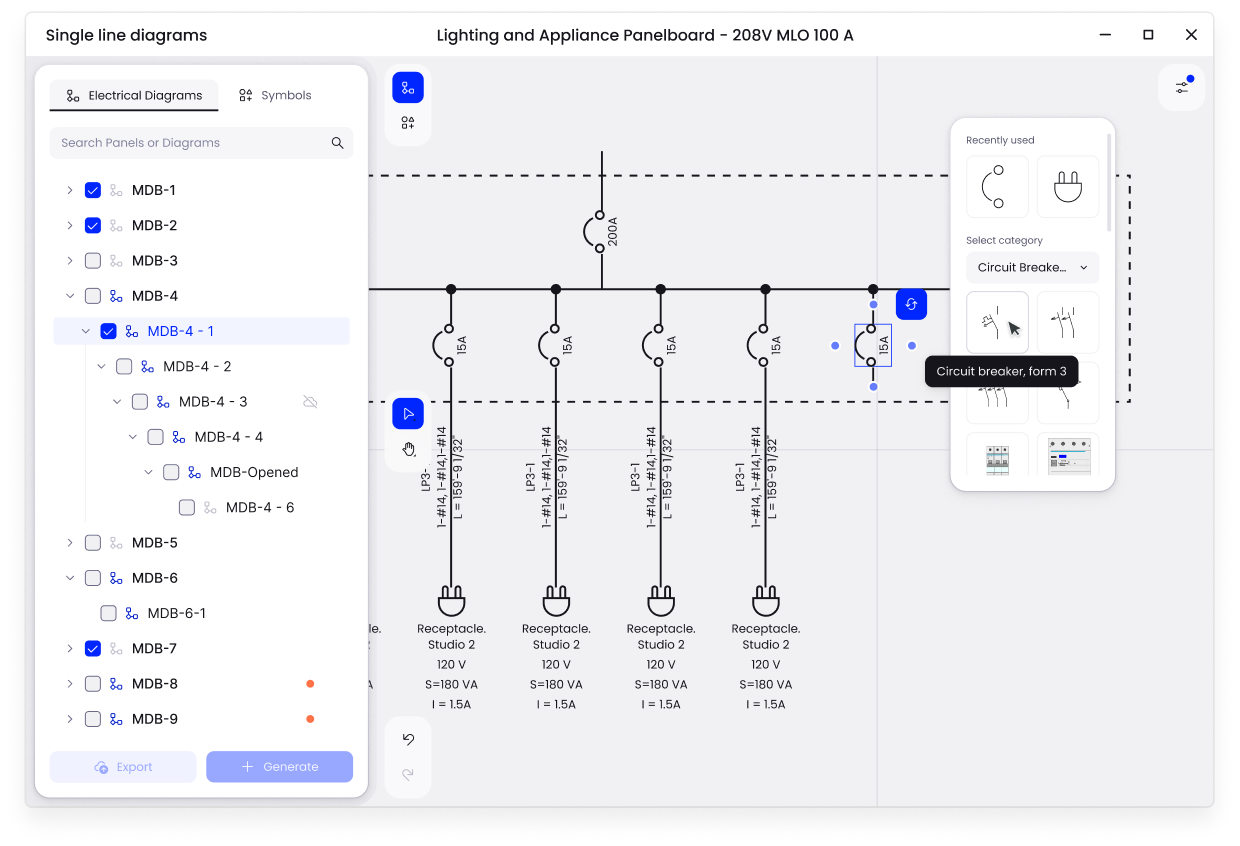
Electrical Pack generates a single-line diagram directly from the Revit electrical model. Engineers select a panel or switchboard and the plugin maps breakers, feeders, and loads from the model into the schematic. The diagram can then be converted into a Revit Drafting View for documentation. Plus, circuit or rating changes in the Revit model can update the schematic automatically, thus keeping the diagram connected to the underlying model data.
Generated diagrams are updated automatically in the background, without any action from the user, which keeps the diagram connected to the underlying model data. A manual update is needed only after significant changes in the model. Drafting Views generated earlier are not deleted when the diagram is updated. They are refreshed automatically on the sheets where they are already placed.
Electrical Pack also includes a Family Creator for single-line diagrams. Engineers import their own graphics, the symbol is created on the fly, and it’s exported as a native Revit family, so company-standard symbols don’t require manual work in the Family Editor.
FYI: I’ve demonstrated how Electrical Pack creates single-line diagrams in this LinkedIn post. For a more detailed look at the workflow, check out this video from our Getting Started series.
Both products therefore solve the same general problem, i.e., they turn electrical model data into a documented single-line representation. The main difference is how the workflow is organized and how engineers interact with the resulting diagram.
In Electrical Pack, the link between the model and the diagram works in both directions: changes in the model update the diagram, and changes made in the diagram update the model.
ElectroBIM doesn’t have this two-way link, and the user has to run the Update command manually and wait for it to finish, while Electrical Pack updates generated diagrams in the background.
Wire sizing
Accurate wire sizing is critical in electrical engineering to prevent conductor overheating and maintain safe voltage drop levels across distribution paths.
ElectroBIM automatically sizes wires and breakers for electrical circuits based on the applicable load and sizing rules. For branch circuits, breaker sizes are calculated from the connected load, with wire sizes following from the selected breaker. Engineers can manually resize individual wires when needed, including for voltage-drop requirements. Motor circuits can also use FLA, MCA, and MOCP values in the sizing process.
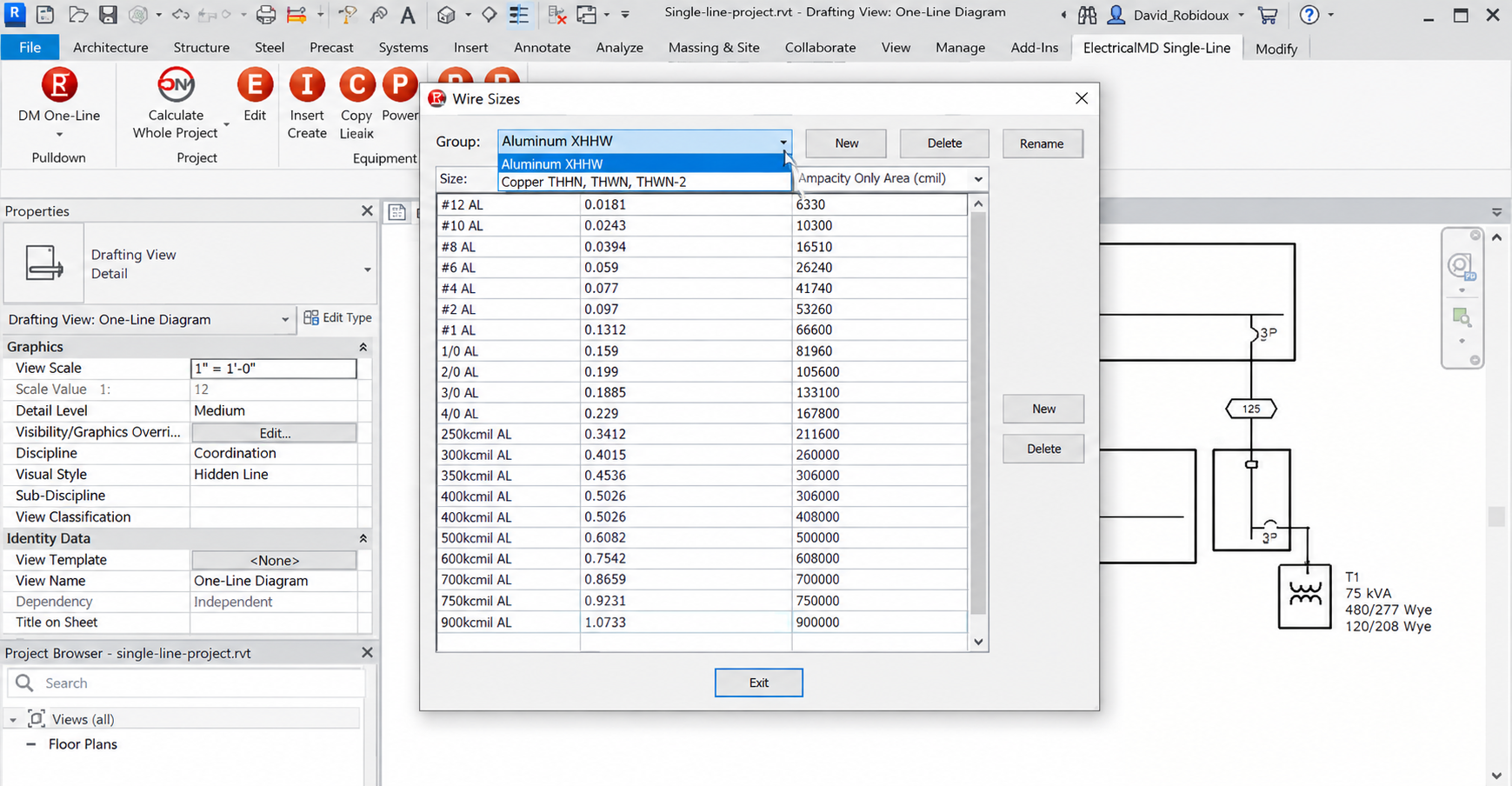
Electrical Pack provides automatic and manual wire selection within the Revit workflow. The Property Palette gives engineers direct access to inputs such as wire type, temperature rating, number of runs, ambient temperature, ampacity, and voltage-drop data, and the Electrical Settings provide configurable wire size, ampacity, impedance, breaker, and fuse data. This allows wire selection to account for circuit length and electrical calculation parameters as well as keeps the relevant data connected to the Revit model.
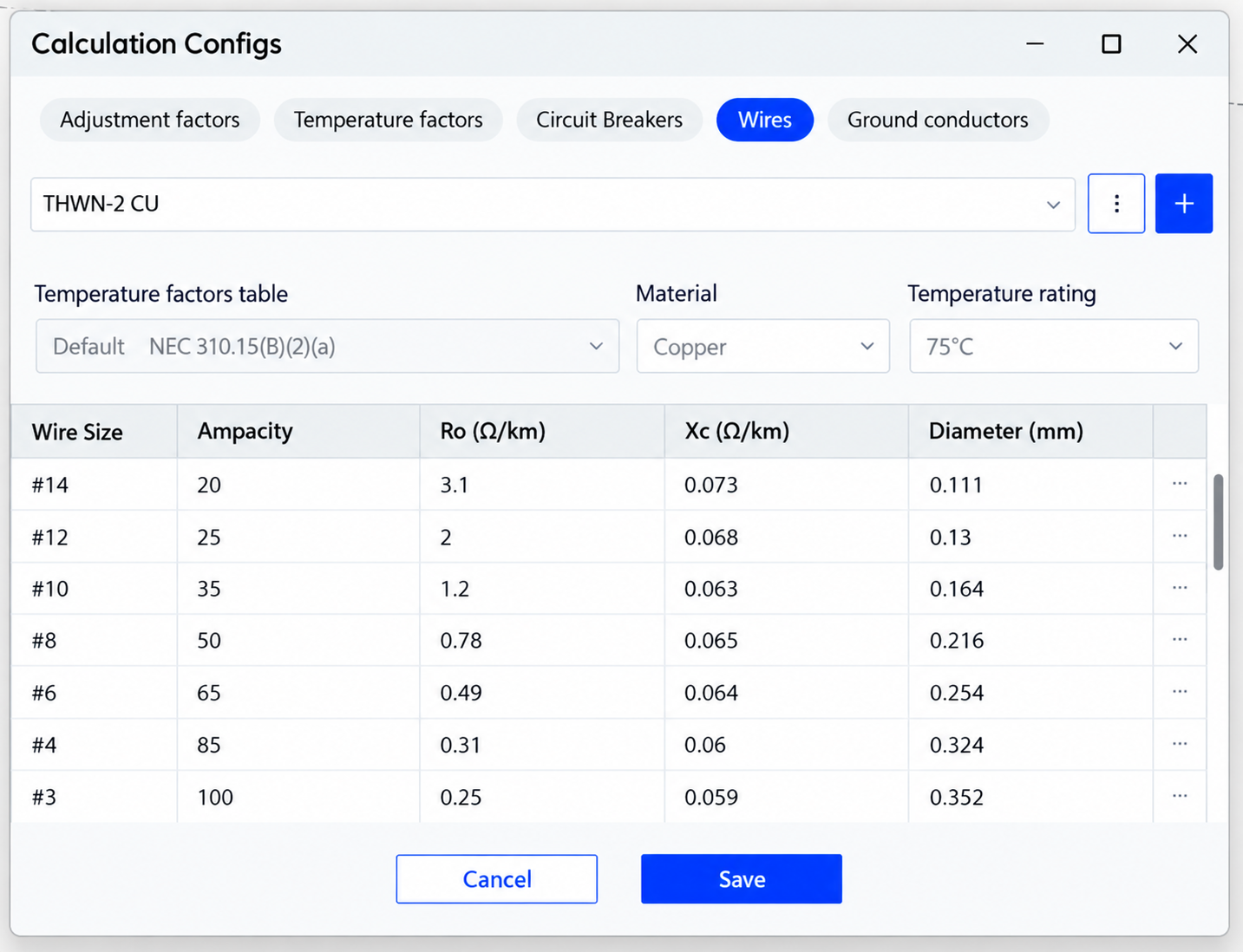
The main difference is in the sizing approach. ElectroBIM focuses on automatic sizing from connected loads and circuit rules, and also allows engineers to change the rating and wire size manually. Electrical Pack selects wire size automatically from the electrical circuit data in the model and also supports manual selection, with the sizing parameters available in the Property Palette.
Voltage drop
Voltage drop is particularly important on longer circuits and on electrical distribution systems with several levels between the source and the final load.
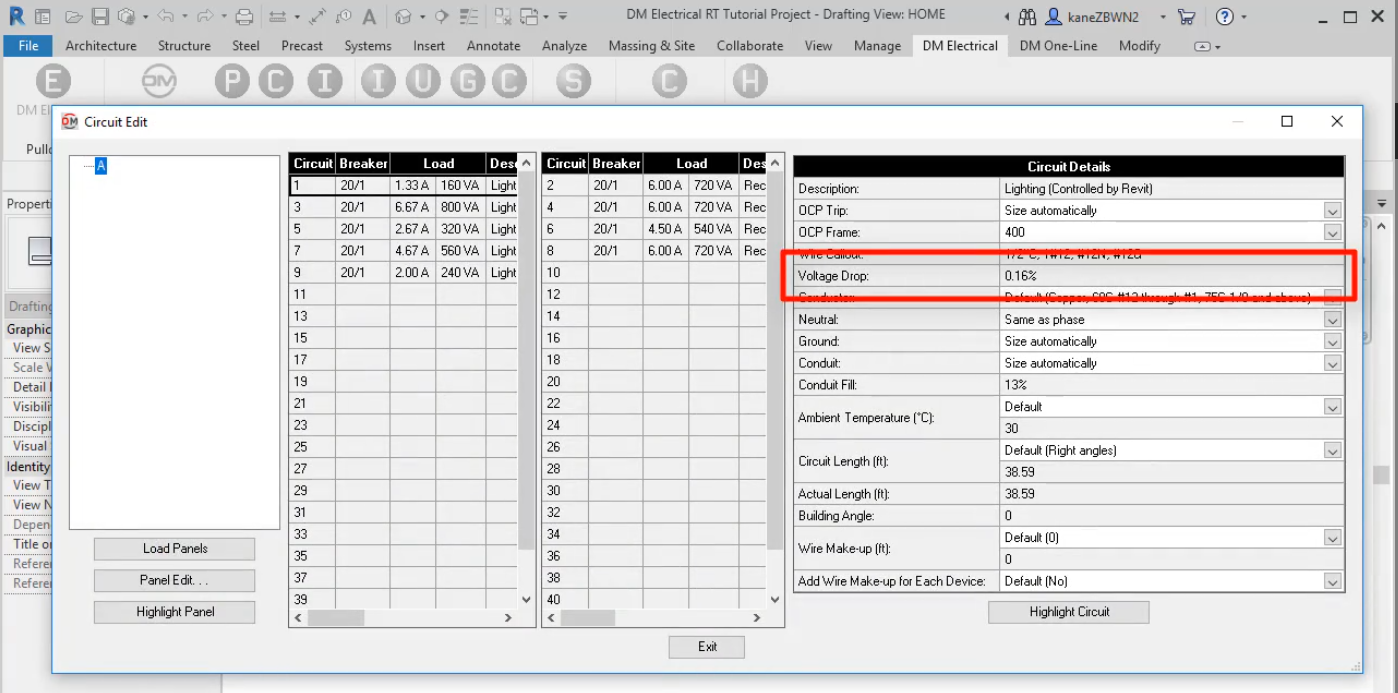
ElectroBIM calculates voltage drop along the full circuit path and can automatically increase feeder and branch-circuit conductor sizes when configured voltage-drop limits are exceeded. Its calculations use the selected wire sizes and circuit lengths derived from the electrical model. The software has its own logic for circuit length and distributed load, and it also provides voltage-drop schedules.
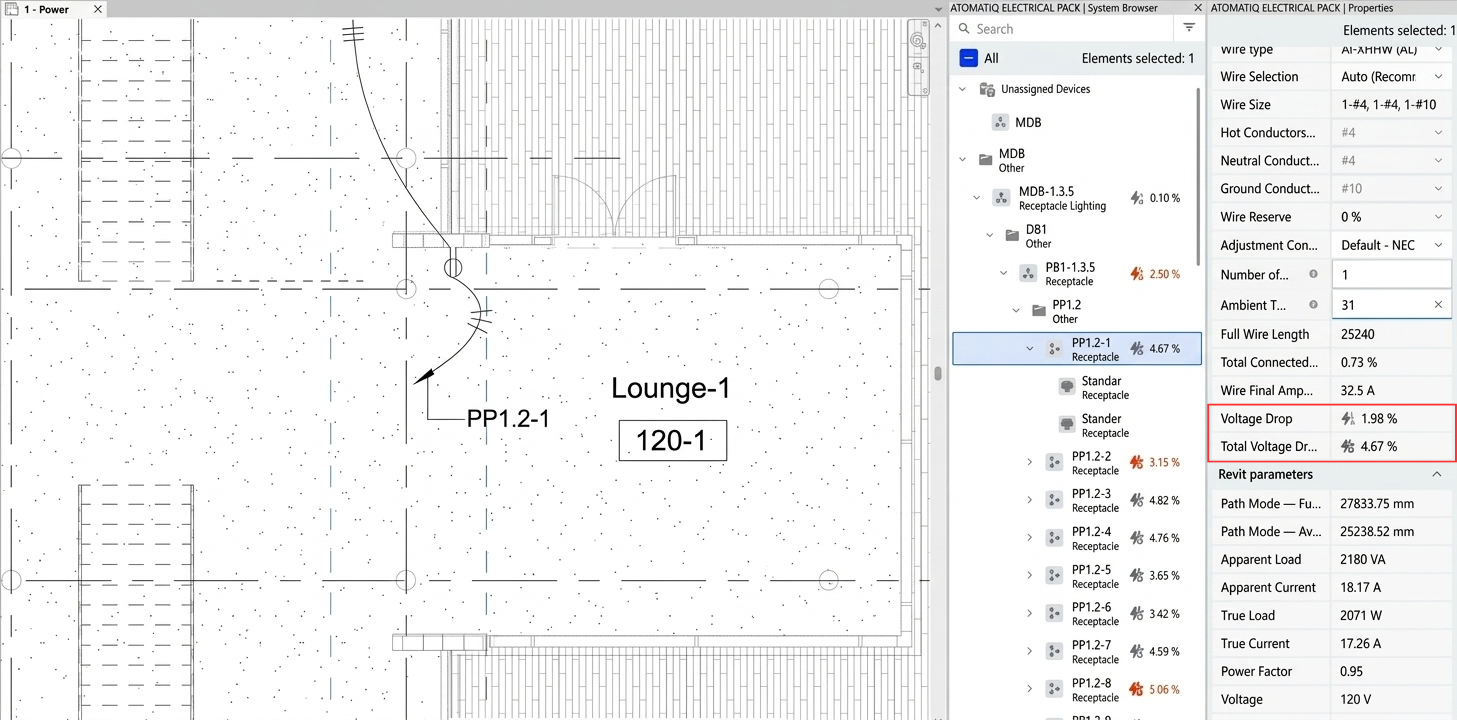
Electrical Pack follows the distribution hierarchy through the Revit model and calculates voltage drop across the distribution path, from the main service panel through sub-panels and downstream circuits to the final point. The System Browser represents feeder and branch-circuit relationships together with total voltage drop and can highlight circuits that exceed configured voltage limits.
There is one difference in the calculation itself. ElectroBIM handles distributed load, where the electrical load is spread evenly along the length of the circuit. Electrical Pack currently applies the whole load at the end of the circuit. For circuits such as lighting this is less accurate: the calculated voltage drop is higher than it would be in practice, which can lead to a larger conductor size than necessary. With distributed load the voltage drop is lower, and a smaller conductor can be selected.
This is particularly relevant with Revit 2026. Autodesk removed the legacy automatic wire-sizing functionality in that release, and the previous Voltage Drop parameter and wire-sizing controls are no longer available in the same form. Autodesk’s documentation describes cable sizing as unavailable in Revit 2026 and points users toward custom automation or third-party add-ins when this functionality is required.
Conduit modeling and openings
Physical conduit routing and penetration modeling bridge the gap between engineering calculations and constructible BIM models and help ensure that spatial conflicts with walls, slabs and structural elements are caught long before installation.
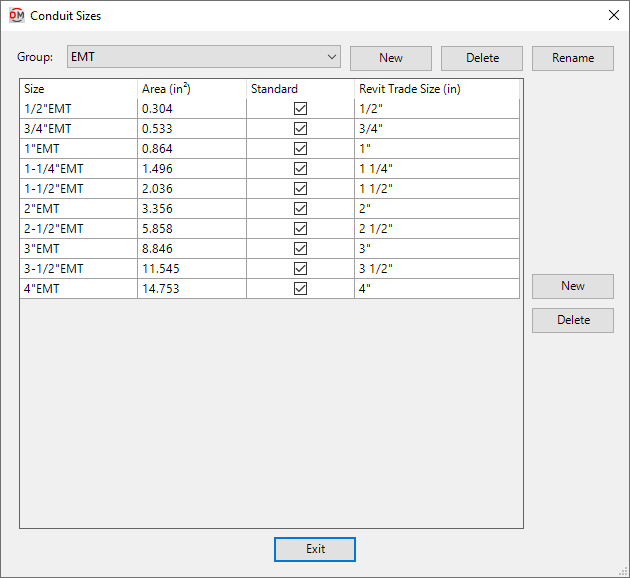
ElectroBIM provides automatic conduit sizing based on the wires in a feeder and allows teams to customize conduit sizes and groups. It also integrates with EVOLVE Electrical, including an export workflow that transfers conduit-run information to EVOLVE for further electrical contracting workflows.
Electrical Pack includes tools for physical Revit modeling. Create Conduits automatically generates conduit paths for selected circuits, placing conduits along the logical connection path between panels, devices and junctions. Opening Manager detects where conduits or trays intersect walls and slabs and places appropriately sized rectangular or round openings.
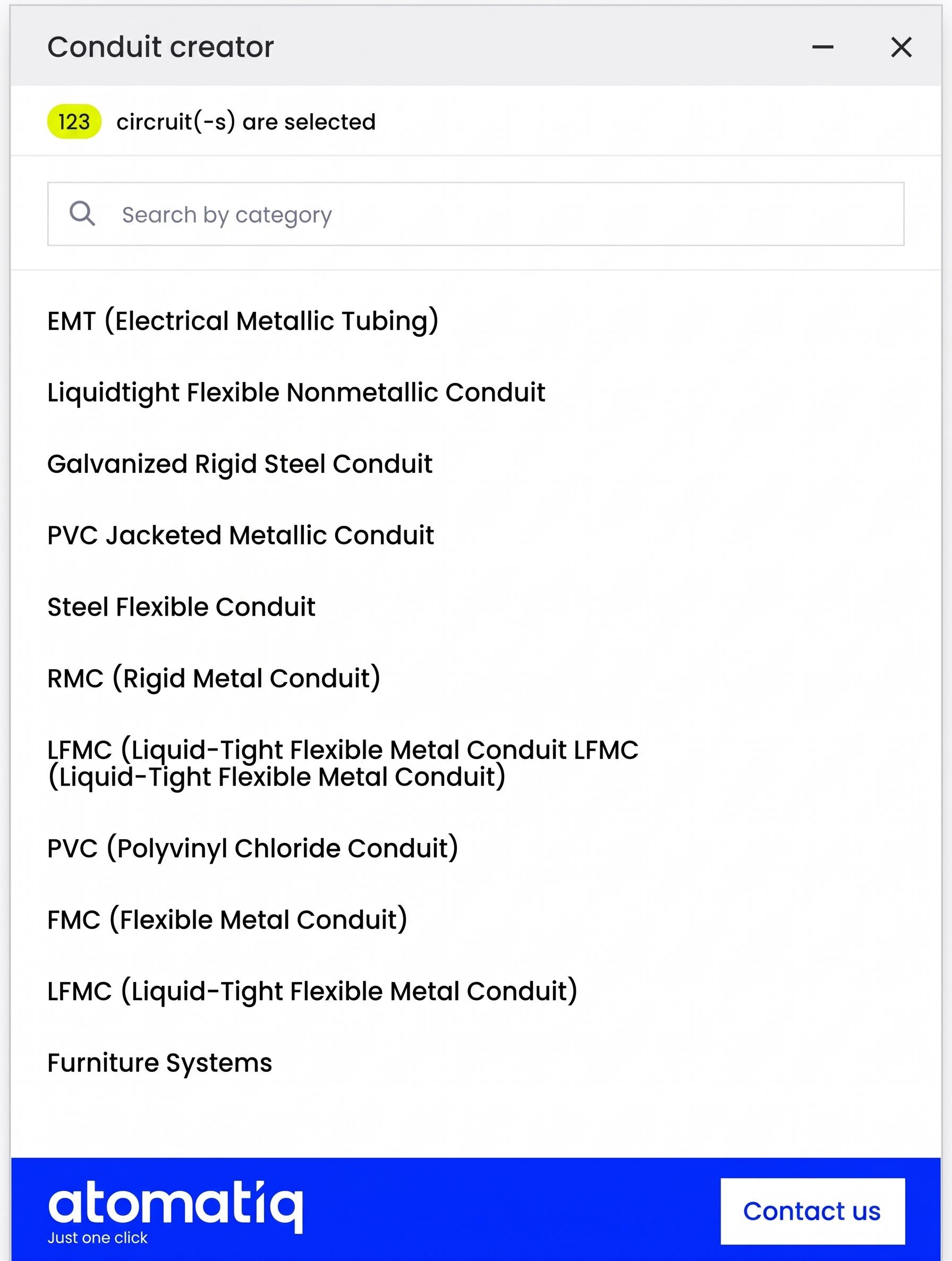
So the distinction is not that one product handles conduits and the other doesn’t. ElectroBIM combines conduit sizing with an EVOLVE integration workflow, while Electrical Pack includes automated conduit path generation and wall/slab opening placement directly in Revit.
Supported electrical standards
Design Master ElectroBIM is primarily designed for the North American market and uses NEC-based defaults and calculation rules. Its documentation notes that compatibility with CEC, IEC, and other international codes is not guaranteed. However, it’s also important to admit that ElectroBIM provides customization that can make some workflows more suitable for international projects, so it would be inaccurate to describe the software as NEC-only.
Electrical Pack supports both NEC-based and IEC-based workflows. Users can work with European standards thanks to configurable wire libraries, calculation templates, and adjustable electrical data such as wire sizes, breaker ratings, ampacity, impedance, and calculation rules.
This is an important distinction in a Revit electrical plugin comparison. ElectroBIM starts from a North American, NEC-focused configuration with international customization available, while Electrical Pack provides NEC- and IEC-based configuration as part of its product workflow. Its configuration is tailored to a wider range of markets: North America, Europe and other regions that use the IEC standard.
User experience and data workflow
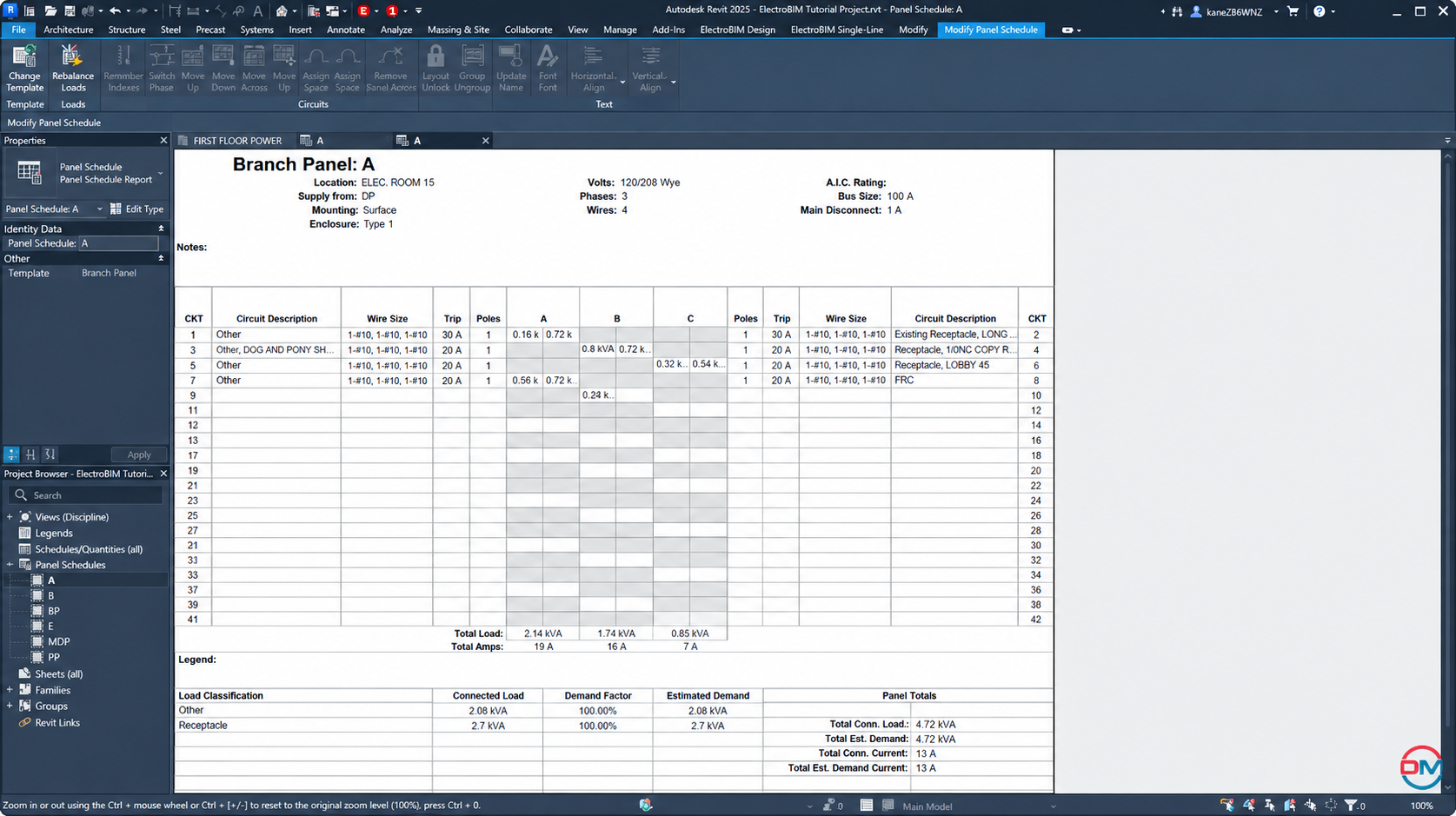
ElectroBIM adds its own shared parameters to Revit distribution equipment and branch circuits. Those parameters can then be used in standard Revit schedules and in ElectroBIM’s dedicated schedules, including voltage-drop, fault-current, and feeder ID schedules. The software can also insert a feeder schedule into a Revit Drafting View.
Electrical Pack includes the System Browser for navigating feeder and branch-circuit relationships, along with schedules and the Property Palette for reviewing and editing electrical data. The System Browser also presents total voltage-drop information alongside the feeder and branch-circuit hierarchy, while the Property Palette provides direct access to the electrical parameters used in the workflow.
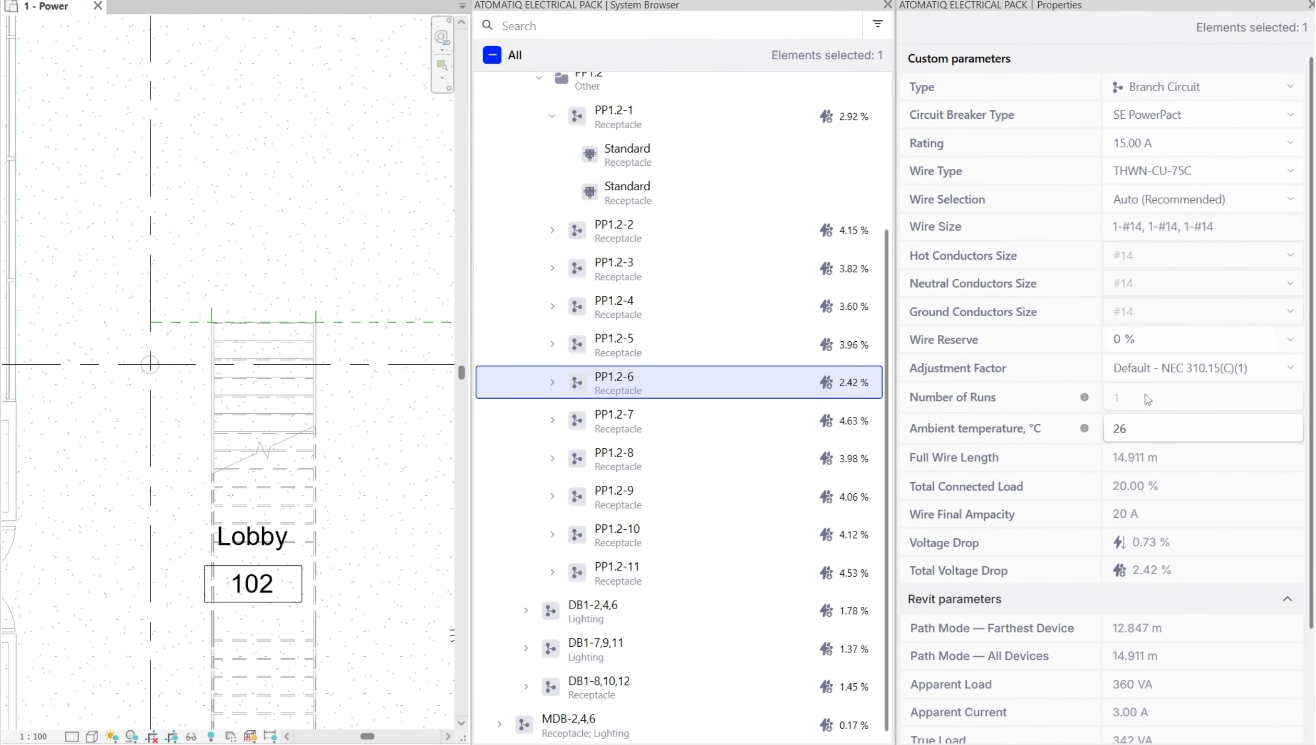
For teams that evaluate top electrical Revit plugins, the difference is therefore largely in how electrical information is exposed and managed. ElectroBIM relies predominantly on its shared parameters, schedules, and dedicated commands. Electrical Pack, for its part, combines the System Browser, Property Palette, templates, and electrical settings into one workflow.
The two products also differ in how they process data. Electrical Pack works independently of Revit’s native interfaces and responds to changes in the model right away, regardless of the number of circuits and diagrams. In ElectroBIM, which depends heavily on Revit, each update can take several minutes.
User interface and day-to-day workflow
The way electrical information is presented can have a huge effect on everyday work in Revit. Engineers may spend much of their time switching between diagrams, model elements, settings, and calculation inputs, so the interface can influence how quickly they can make and review design changes.
ElectroBIM provides a broad set of Revit commands, settings, customization tools, and calculation workflows. However, some engineers point out that the tool’s interface can feel somewhat dated and less intuitive, particularly for engineers who are new to the software.
Electrical Pack takes a more visual approach with a convenient Miro-like canvas interface. Engineers can see the electrical design directly on the canvas and make changes to the elements they are working with, with many common actions requiring only a few clicks. So, rather than moving between multiple command dialogs to manage a diagram, engineers can work directly with the elements displayed in the same workspace.
Thus, for an experienced ElectroBIM user, the command-based workflow may already be familiar. But for someone evaluating an ElectroBIM competitor or learning a new electrical design tool, the difference in how the two interfaces organize everyday work can be more noticeable.
AI and automation capabilities
AI is now becoming part of Revit electrical workflows, yet the two products in our ElectroBIM alternatives for electrical engineers guide currently approach it differently.
ElectroBIM introduced AI-assisted electrical design features and added an MCP Server in Version 2.9 (released August 2026). According to its release documentation, the MCP connection allows external AI assistants to interact directly with ElectroBIM and the live Revit model. Documented capabilities include designing circuits and panels through natural language prompts, creating and balancing circuits, adding loads, recalculating, querying model information, and updating families and parameters in bulk.
Electrical Pack focuses its automation on core electrical engineering tasks, including automated calculations, model-based single-line diagrams, configurable templates, electrical data management, conduit generation and opening placement. It also supports MCP-based AI workflows that can automate tasks such as element placement, circuit creation and circuit-path routing. This can help reduce repetitive manual work, automate sequences of actions and reduce the time designers spend on routine tasks.
I’ve recently demonstrated these capabilities on my LinkedIn page through examples of automated electrical layout, AI-assisted circuit routing, and AI-generated circuits.
Pricing
Pricing is one of the most visible differences between the products, although the pricing models are structured differently.
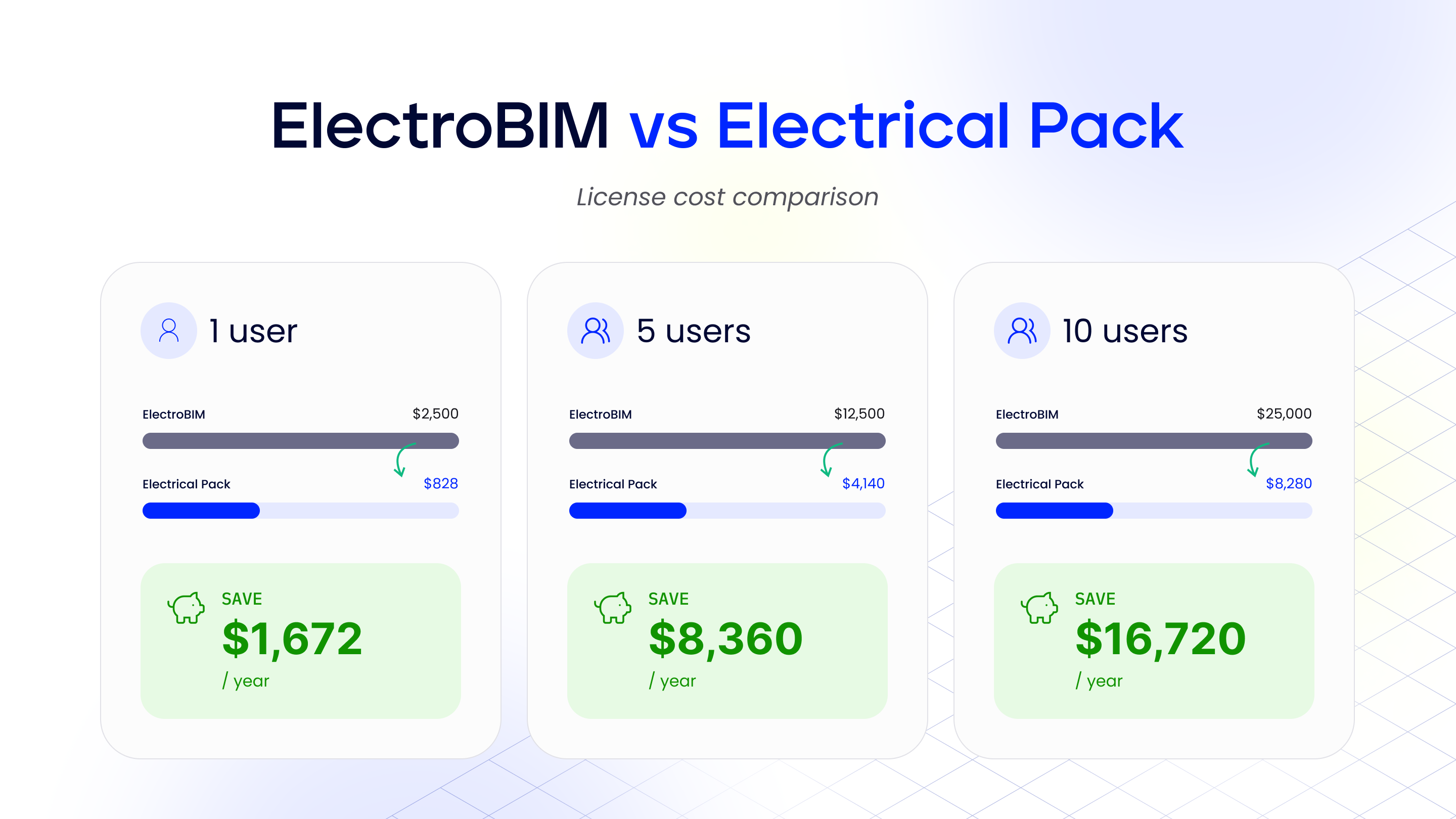
ElectroBIM currently publishes the following pricing:
- Dedicated license (one named user): $2,500 per seat/year, or $250 per month
- Floating license (one active session shared across the team): $10,000 per seat/year, or $1,000 per month
The full-featured trial has no time limit, although trial drawings contain watermarks. Design Master also offers a monthly single-user license for teams that want to evaluate the software without the trial watermark.
Electrical Pack currently uses a paid subscription model. Its official prices are listed in euros: €720 per year, or €75 per month when billed monthly. For convenience, we converted them to US dollars, which gives $828 per year, or about $1,032 per year when billed monthly. The current Pro plan provides unlimited access, unlimited active projects, and team seats, while Enterprise adds custom configuration, priority support, onboarding, and volume pricing.
Supported Revit versions
Design Master ElectroBIM currently supports Revit 2021 through Revit 2027. Revit 2027 support was added in ElectroBIM 2.7.3, released in April 2026.
Electrical Pack currently supports Revit 2025 through Revit 2027, with earlier versions available on request.
Support and learning resources
ElectroBIM has a substantial published learning system. Its tutorials are sequential, include sample Revit projects for supported versions, and contain embedded video demonstrations. The company also provides documentation, release notes, phone and email support, and live chat.
Electrical Pack provides product demonstrations, recorded video tutorials, plus onboarding and a 14-day trial for teams that want to test the software on their own Revit projects. Enterprise support is available for teams that need custom configuration, priority support, onboarding, and other team-level requirements.
FYI: as a newer product, Electrical Pack is still expanding its documentation library. Installation guides and additional support resources are currently being developed.
Which solution fits your Revit workflow?
The scenarios below highlight some common use cases to help you determine whether Electrical Pack could be the right ElectroBIM alternative for your Revit workflow.
| Scenario | Better fit |
|---|---|
| Small electrical design team looking for lower monthly cost | Electrical Pack |
| Large North American engineering firm needing arc-flash and time-current-curve (selective coordination) workflows | ElectroBIM |
| Engineers working across NEC and IEC-based projects, including EU-standard projects | Electrical Pack |
| Design office that needs fault-current (short-circuit) calculations in Revit right away | ElectroBIM |
| Designers who want single-line diagrams to update automatically in the background and stay linked to the model in both directions | Electrical Pack |
| Company sizing lighting and other circuits with distributed load | ElectroBIM |
Where ElectroBIM goes beyond Electrical Pack
Electrical Pack covers many of the core electrical design workflows that Revit teams use every day, but the products are not identical.
Yet, we must admit that ElectroBIM includes some specialized power-system analysis and automation features that Electrical Pack, an ElectroBIM alternative, does not currently offer.
These include:
- Short-circuit and fault-current calculations, including available fault current at panels and transformers and AIC checks (in final development for Electrical Pack, expected in October 2026)
- Arc-flash calculations and PPE documentation (planned for Electrical Pack later this year)
- Selective coordination, including time-current curve analysis
- Distributed-load voltage-drop calculation for circuits such as lighting (not yet available in Electrical Pack)
Where Electrical Pack outperforms ElectroBIM
Electrical Pack also has several areas where its workflow differs from ElectroBIM, namely:
- Faster and more responsive electrical workflows supported by Electrical Pack’s independent architecture
- A more convenient and visual user experience, with a Miro-like canvas and dedicated interfaces for common electrical design tasks
- NEC and IEC-based configuration for projects working with different electrical standards
- Virtual circuits for renovation and reconstruction projects that allow designers to represent existing electrical circuits without recreating the entire existing system as new Revit objects
- Single-line diagram workflow built around an interactive canvas, with a two-way link between the model and the diagram, automatic background updates, and a Family Creator that turns custom symbols into native Revit families
- Dedicated System Browser for navigating feeder and branch-circuit relationships and reviewing total voltage drop
- Configurable electrical libraries and templates for wire data, ampacity, impedance, breakers, fuses, correction factors, and other calculation inputs
- Opening Manager for wall and slab openings around conduits and trays
- Team configuration through Collaboration Hub, including shared calculation tables, circuiting rules, symbols, and templates
Final verdict: ElectroBIM vs Electrical Pack: which one is better?
ElectroBIM is a long-established electrical design tool for Revit with a broad range of engineering features. It covers single-line and riser diagrams, wire sizing, voltage drop, fault-current calculations, arc flash, selective coordination and newer AI-assisted workflows. Yet, its higher licensing cost can be a significant consideration for some engineering teams, plus some users may find its interface a bit outdated and not so intuitive.
Electrical Pack covers the core Revit electrical workflows teams use every day, including wire sizing, voltage drop, single-line diagrams, electrical data management, conduit routing, and openings. It also features a more intuitive and convenient interface, a responsive electrical workflow, virtual circuits and loads for renovation projects (planned for this year), and AI-assisted automation. Combined with its lower subscription cost, these capabilities make Electrical Pack a practical ElectroBIM alternative for teams whose projects fall within its scope.
Whichever tool you choose, it’s always a good idea to contact the plugin provider to confirm that the available features, standards, Revit version, licensing model, and support options match your team’s projects and workflow before making a decision.
FAQ
What is an ElectroBIM alternative for Revit?
An ElectroBIM alternative for Revit is another Revit add-in that provides electrical design, calculation, documentation, or automation workflows.
To date, there are many ElectroBIM alternatives for electrical engineers, with Electrical Pack being one of them. The plugin covers key Revit electrical workflows such as wire sizing, voltage-drop calculations, single-line diagrams, electrical data management, conduit routing, and openings.
Is Electrical Pack an ElectroBIM competitor?
Yes. Both products provide electrical design tools for Revit and overlap across several core workflows. Their feature sets are not identical, however, particularly when it comes to specialized power-system studies.
How much does ElectroBIM cost?
ElectroBIM currently lists a dedicated (single named user) license at $2,500 per seat per year, and a floating license at $10,000 per seat per year.
For smaller teams or companies with tighter software budgets, these licensing costs may be a significant investment, particularly for floating licenses.
What should I consider in a Revit electrical plugin comparison?
A Revit electrical design software comparison should cover the electrical features you need, together with pricing, supported Revit versions, standards, interface, data management, automation, and support.
For engineering teams, it’s also important to check whether the product covers specialized calculations such as fault current, arc flash, or selective coordination.
Product Lead, Electrical Pack
Sergey Zhebelev is an electrical design and BIM professional with over 20 years of experience in building electrical systems. As Product Lead of Electrical Pack, he focuses on automating Revit workflows and developing practical tools for electrical engineers. An Autodesk Certified Professional in Revit for Electrical Design, Sergey shares his expertise in BIM automation and electrical engineering.