6 Bluebeam alternatives in 2026 and beyond

CEO & Co-founder
Published
Updated

TL;DR
Many teams are looking for a Bluebeam replacement because: 1) the tool has become too expensive; 2) Revu 20 is reaching end of life; 3) it isn’t always convenient for live coordination inside Revit.
In this article, we look at 6 Bluebeam alternatives for 2026 and beyond, covering three common needs: working with PDFs (Foxit PDF Editor and Adobe Acrobat), full-scale BIM coordination (Autodesk Forma and Revizto) and collaboration directly inside Revit (Pinly and Newforma Konekt).
3 main reasons why some businesses have been considering Bluebeam alternatives
If your team has been using Bluebeam for years, you probably know the feeling: the software works well and comes with a wide range of useful features. Yet recently, we’ve heard many of our colleagues and clients asking the same question: what are the practical alternatives to Bluebeam in 2026?
There are three main reasons why this question has been coming up more often.
1. Subscription costs
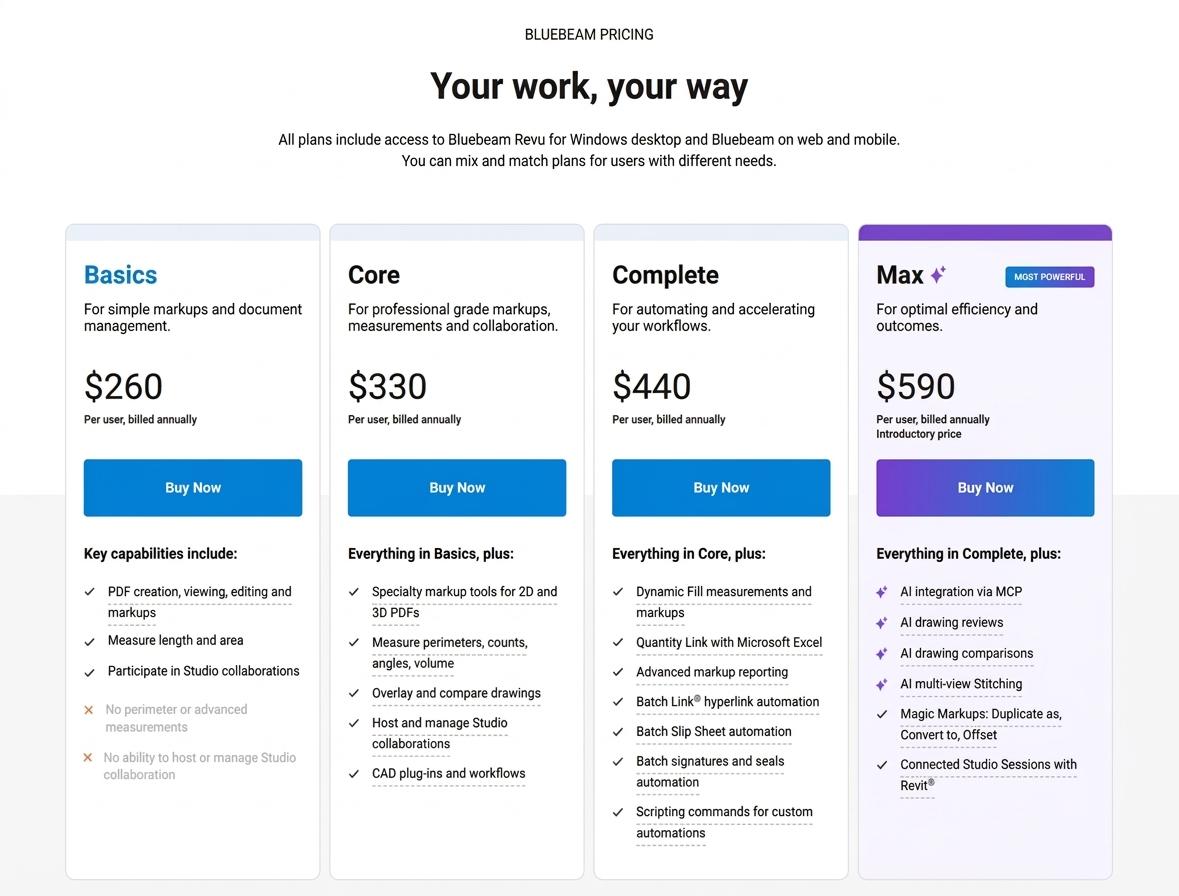
The first is cost. Bluebeam has moved to subscription plans and prices have increased by around 8-10%. Current pricing ranges from $260 per user per year for Basics to $590 for the Max plan.
For a team of 10, even the lower end of that range becomes a noticeable annual expense.
2. Revu 20 is reaching end of life
The second reason is the upcoming end of life for Revu 20. Bluebeam states that support for Revu 20 ended on July 31, 2026, and the product will reach end of life on December 31, 2026.
But this doesn't mean that every Revu 20 installation will stop working on that date. According to Bluebeam, users with a perpetual Revu 20 license can continue running the application locally after December 31, 2026. Still, Revu 20 will lose access to Studio Sessions, Studio Projects, API integrations and other Bluebeam cloud services.
Teams still working with Revu 20 therefore have a practical reason to review their current setup and decide whether to move to a newer Bluebeam plan or consider other options.
3. PDF review and model coordination are different workflows
The third limitation is more technical. Even with newer AI features such as Smart Review, Bluebeam is built primarily around documents, with the PDF serving as the main object of review. It works well for drawings, markups, measurements, takeoffs and document comparison.
However, companies working primarily in Revit may need a more direct way to discuss changes in the 3D model and keep those discussions connected to model elements.
6 best Bluebeam alternatives: which type of tool do you need?
Use the comparison below to evaluate the main differences between Bluebeam alternatives.
| Tool | Comment location | Real-time sync | AI capabilities | Pricing | Onboarding complexity |
|---|---|---|---|---|---|
| Foxit PDF Editor | PDF/Foxit Cloud documents | Yes (shared PDF review and document collaboration) | AI assistant | From $129.99/user/year | Easy; self-service + 14-day trial |
| Adobe Acrobat | PDF/Adobe Cloud collaboration | Yes (shared PDF review workflows) | Generative AI and AI assistant | From $287.88/user/year | Easy; self-service + trial |
| Autodesk Forma | Models/views/issues | Yes (issues and model coordination data between cloud and Revit) | Autodesk AI suite (Autodesk Assistant, Construction IQ, AutoSpecs) | Quote-based | Medium-high; setup + onboarding |
| Revizto | Model viewpoints/issues | Yes (issues and model viewpoints in cloud projects) | Native MCP Server | Quote-based | Medium-high; project setup |
| Pinly | Revit model elements/threads | Yes (live updates of model-linked comments and issue statuses in Revit) | MCP + AI assistants | Free; Pro – $10/seat/month | Easy; self-service + 14-day trial |
| Newforma Konekt | Model viewpoints/issues | Yes (syncs across Revit versions, Navisworks, web, and connected CDEs) | Standard workflow automations and integrations | Quote-based | Medium-high; platform setup |
Bluebeam covers a wide range of tasks, so the right substitute comes down to the exact gaps you need to fill. A good starting point is determining your primary need:
- Work with PDFs
- Coordinate BIM projects
- Or collaborate directly inside Revit
Below is a breakdown of the top tools in each category and how they function in practice.
Bluebeam alternatives for working with PDFs
PDF-focused tools are the closest fit if your team mainly reviews drawings as documents. They cover markup, measurements, editing, document comparison, signatures and collaboration around PDF files but they do not turn the PDF into a model-based coordination environment.
For this type of workflow, Foxit PDF Editor and Adobe Acrobat are two practical alternatives to Bluebeam.
1. Foxit PDF Editor
Foxit PDF Editor supports editing, annotations, measurements, OCR, document comparison, forms, signatures and document management. The solution offers real-time shared reviews, cloud storage integrations, and collaboration through Microsoft Teams. Plus, Foxit AI Assistant adds features such as document summaries, content queries, translation and AI-powered PDF editing.
For larger teams, the solution by Foxit puts more emphasis on administration and integration. Its built-in document management system includes shared workspaces, version control, and check-in/check-out features, while integrations with Microsoft 365, SharePoint, Google Drive, Dropbox, and other services can connect PDF work with existing systems. The platform is available on Windows, the web, and, crucially, macOS, making it a relevant Bluebeam alternative for Mac as well.
- Comment location: PDF/Foxit cloud documents
- Real-time synchronization: Yes, for supported cloud/document collaboration workflows
- AI capabilities: AI assistant
- Price (2026): $129.99/user/year for PDF Editor; $159.99/user/year for PDF Editor+
- Onboarding: Low complexity (self-service purchase, free trial, volume licensing for 30+ seats)
2. Adobe Acrobat
Adobe Acrobat comes in three plans: Acrobat Standard, Acrobat Pro and Acrobat Studio, with each tier adding capabilities to the previous one.
Acrobat Standard covers everyday PDF work such as editing and organizing drawings and documents, converting files to and from PDF, filling out forms, collecting e-signatures, and password protection. Acrobat Pro adds more advanced tools that can be useful in AEC workflows, including OCR for scanned documents, PDF comparison, sensitive-information redaction, web forms, reusable e-signature templates and bulk signature requests.
Acrobat Studio includes everything in Pro and adds AI-focused features through AI Assistant, PDF Spaces and Adobe Express Premium. AI Assistant can summarize project documents, answer questions about their contents, and help with common PDF tasks. PDF Spaces can bring together PDFs, Microsoft 365 files, and web links in one workspace, which can be helpful for construction drawing review when teams need to work with drawings, specifications, reports, and other project documentation from different sources.
- Comment location: PDF/Adobe Cloud collaboration
- Real-time synchronization: Yes, for shared PDF workflows
- AI capabilities: Generative AI and AI assistant
- Price (2026): Acrobat Pro for teams US$287.88/yr per license; Acrobat Studio for teams US$359.88/yr per license
- Onboarding: Low complexity (self-service subscription, free trial)
Bluebeam alternatives for full-scale BIM coordination
If your needs extend beyond document review, specialized BIM coordination software provides a broader project environment. Such tools bring models, drawings, issues, documents and project participants together, which can be useful when coordination spans multiple disciplines, companies, and project stages.
Two options that fit this broader BIM coordination workflow are Autodesk Forma and Revizto.
3. Autodesk Forma
Autodesk Forma (formerly Autodesk Construction Cloud) operates as a cloud-based common data environment (CDE) for connecting design, model coordination, and construction execution.
Its model coordination tools allow project teams to aggregate architectural, structural, MEP, and trade models in a central workspace to run automated clash detection, review constructability issues, and manage resolution workflows. Teams can compare design iterations over time, monitor spatial changes across model versions, and control formal package exchanges across project phases.
Positioned beyond 2D document review, Forma fits multi-discipline projects where stakeholders must resolve 3D spatial collisions and track model modifications before field execution.
- Comment location: Cloud/model viewpoints and elements through Autodesk Issues
- Real-time synchronization: Yes, issue data can sync between Autodesk cloud services and Revit
- AI capabilities: Autodesk AI suite (Autodesk Assistant, Construction IQ risk analytics, AutoSpecs submittal generation, bid forwarding)
- Price (2026): Quote-based
- Onboarding: Medium to high complexity (requires cloud setup, permission configuration and team onboarding)
4. Revizto
Revizto operates as a BIM coordination platform that brings 2D drawings and 3D federated models into one interactive workspace. Teams can review the project from different perspectives using 2D/3D overlays, Splitview, and AR/VR while its clash automation tools help detect clashes, group related issues and review coordination problems across multiple disciplines.
For issue tracking, Revizto stamps and syncs 2D/3D markups directly to their exact spatial location in the model, making issue statuses accessible across web, desktop, and mobile devices. Real-time project metrics, issue trends, and model data can be exported via custom dashboards, reports, and a dedicated Issue API.
For teams exploring AI-assisted BIM coordination, Revizto also offers its native MCP Server. It allows external AI assistants to query project information, run model audits and help with issue triage using natural-language requests.
- Comment location: Cloud/model viewpoints and coordination issues
- Real-time synchronization: Yes; cloud-based collaboration and shared project data
- AI capabilities: Dedicated MCP Server (supports external AI querying, model auditing, automated issue analysis and triage)
- Price (2026): Quote-based. Current plans include per-user, per-project and enterprise usage-based licensing
- Onboarding: Medium to high complexity (project setup, team-wide adoption)
Bluebeam alternatives for collaboration inside Revit
Revit collaboration tools keep design reviews and issue tracking anchored to the model. Because comments stay tied to specific views, locations, and elements, your team can resolve design decisions in place, without introducing an overly complex construction management suite.
Examples of tools in this category include Pinly and Newforma Konekt.
5. Pinly
Pinly is a collaboration plugin for Autodesk Revit that keeps design discussions and issue tracking connected to the model. With Pinly, team members can add comments to specific model elements, reply in threaded discussions, assign and resolve issues and manage feedback through a side panel without leaving Revit. This can reduce the manual work involved in coordination as well as help teams locate model elements, prepare screenshots, update issue statuses, and follow up on design changes much more efficiently.
Although the Pinly plugin itself runs in Revit on Windows, its Collaboration Hub makes project feedback accessible beyond the Revit environment. Team members can follow comments, notifications and project updates through the shared workspace, which can be useful when not everyone on the team works directly in Revit or needs access from a Mac.
Noteworthy is that Pinly also acts as an AI-ready collaboration layer through MCP integration. External LLMs and AI assistants can connect to the solution using secure MCP tokens, work with comment and issue data, and turn discussion threads into insights or automated reports. For BIM teams, this opens up practical opportunities to reduce repetitive work during reviews such as preparing coordination reports, processing batches of issues, and identifying unresolved or recurring problems.
- Comment location: Model element/external Pinly database
- Real-time synchronization: Yes; live updates via WebSockets
- AI capabilities: Yes; MCP endpoint/tokens for AI assistants and LLM integrations
- Price (2026): Highly accessible entry point (free tier for 1 seat and up to 3 active projects; Pro at $10/seat/month; Enterprise custom pricing)
- Onboarding: Low complexity (quick Revit add-in setup, self-service free tier)
6. Newforma Konekt
Newforma Konekt operates as an AEC project information management hub, combining BIM Track’s issue-tracking engine with enterprise document control. Its in-app Revit add-in enables design teams to create, view and resolve issues directly within 2D plans, sections, callouts or 3D views. Issues logged on 2D sheets dynamically transpose into 3D spatial model pinpoints. When an issue is selected inside Revit, custom scripts automatically trigger camera positioning, orthographic/perspective view switching, and section box isolation around affected elements.
Beyond model-based coordination, Konekt handles enterprise project communications by capturing Outlook email threads, RFIs, submittals, contract changes, and scheduled sheet/model publications into a central repository. It uses open BCF (BIM Collaboration Format) standards to sync issue data across different Revit software versions, Navisworks, AutoCAD, Procore and web browsers.
- Comment location: Cloud/model viewpoints and issue locations
- Real-time synchronization: Yes; issues and project information synchronize across connected workflows
- AI capabilities: Automation and integrations are available
- Price (2026): Quote-based
- Onboarding: Medium to high complexity (broader platform deployment and third-party integrations)
Bluebeam vs. Pinly: our honest comparison
The main difference between Bluebeam and Pinly is where the review happens and where project discussions are connected.
Bluebeam is a stronger fit for PDF-centered workflows. If your team regularly handles takeoffs, detailed PDF markups, drawing comparisons and reviews with external consultants or subcontractors who do not work in Revit, Bluebeam provides a mature set of tools for that workflow. Its Connected Studio Sessions can also connect Revu and Revit for teams that use both.
Pinly is a better fit for model-centered collaboration. If your team spends most of its time in Revit and wants comments attached to specific walls, ducts, beams, equipment, or other model elements, Pinly keeps those discussions connected to the model. This makes it a good option for teams that want design feedback to remain tied to the elements being reviewed.
AI capabilities are another difference between the two tools. Bluebeam’s Max plan includes AI drawing review, drawing comparison, multi-view Stitching, and MCP integration, with AI working primarily with PDF and drawing content.
Pinly, for its part, connects to external AI assistants through MCP, allowing them to work with project comments and issues and add comments directly in Pinly. AI-generated comments are marked with a special icon, which makes them easy for the team to distinguish from manually added feedback.
| Aspect | Bluebeam (Max) | Pinly |
|---|---|---|
| Primary object of review | PDF drawings and documents | Revit model elements |
| Best suited for | Takeoffs, PDF markups, drawing comparison, external reviews with consultants and subcontractors | Design coordination and issue tracking directly inside Revit |
| Comment location | PDF sheets and markups | Specific walls, ducts, beams, equipment and other model elements |
| Real-time collaboration | Studio Sessions and shared PDF workflows | Live updates of model-linked comments and issue statuses in Revit |
| AI focus (2026) | AI drawing review, drawing comparison, multi-view Stitching, MCP integration (PDF and drawing content) | MCP integration for external AI assistants to work with comments and issues; AI-generated comments marked with a special icon |
| Typical team fit | Teams whose review process starts and ends with PDFs, including external stakeholders | Revit-based design teams who want feedback tied to the model without heavy enterprise CDEs |
What is the best Bluebeam alternative for your team?
Which Bluebeam alternative makes sense for your team depends on the type of work you need to support and where your review and coordination happen.
- Stay with Bluebeam if your primary focus is 2D PDF markups, quantity takeoffs, and standardized sheet reviews within an established PDF-based workflow.
- Go with Foxit PDF Editor or Adobe Acrobat if you need a cross-platform solution for PDF editing, document comparison, markup and administrative sign-offs without model-based BIM coordination.
- Consider Autodesk Forma or Revizto if your projects require a broader BIM coordination environment for multidisciplinary models, clash detection and issue management.
- Turn to Newforma Konekt if you need BCF-based issue tracking across multiple CAD/BIM platforms while connecting Revit discussions with project information such as emails, RFIs, and contract-related workflows.
- Try Pinly if your team of 50-500 designers wants an affordable and real-time feedback loop directly inside active Revit models without the cost and overhead of heavy enterprise CDEs.
For teams that are still deciding between different options, it can also be useful to contact a solution provider to discuss your current workflow, licensing requirements and implementation needs before making a change.
FAQ
Is Bluebeam free?
No, Bluebeam is not free. It is a paid tool, with plans ranging from $260 per user per year for Basics to $590 per user per year for Max.
Why are teams moving off Bluebeam in 2026?
Several factors are prompting teams to look for Bluebeam alternatives in 2026. Pricing is one of them: Bluebeam plans range from $260 to $590 per user per year, which can add up quickly for larger teams. Another factor is the official end of life for Revu 20 on December 31, 2026, after which teams using that version will need to move to a newer product or consider other options.
There is also a workflow-related limitation. Bluebeam is primarily designed for PDF-based review, so it doesn't provide the same experience as model-based coordination tools that support real-time design review of changes and issues directly in a 3D BIM environment.
Are there any good Bluebeam Revu alternatives?
Yes, there are. The right Bluebeam Revu alternatives depend on what you need from the software.
If you’re looking for a PDF markup alternative, Foxit PDF Editor and Adobe Acrobat are suitable for PDF editing, markup, measurements, and document review.
Autodesk Forma and Revizto cover broader BIM coordination workflows, while Pinly and Newforma Konekt focus on collaboration around Revit models and project issues.
Is there a Bluebeam alternative for Mac?
Yes. Foxit PDF Editor and Adobe Acrobat are available for macOS and cover common PDF workflows such as markup, editing, measurements, and document review.
How is AI used in modern construction drawing review?
Modern AI for construction goes far beyond basic text summaries. Top platforms leverage AI to automate 2D symbol takeoffs, extract submittal logs from specifications, analyze project risks and connect live model comment threads to external LLMs for automated reporting.
Meanwhile, tools like Pinly take a model-based approach, using MCP to connect external AI assistants with Revit comments and issues and add AI-generated feedback directly to the collaboration workflow.
CEO & Co-founder
Ilia Ivanov is a BIM and AEC software development expert with over 10 years of experience. He specializes in Autodesk Revit, BIM automation, and custom software development for the AEC industry. Ilia shares practical insights on the Revit API, AI-powered engineering workflows, and building tools that help design teams work more efficiently.