Pinly vs Autodesk Issues: what Revit teams need to know

CEO & Co-founder
Published
Updated
TL;DR
Autodesk Issues is a solid choice for teams that are already working in ACC/Forma. Pinly is worth considering when the team works primarily in Revit and needs issues that stay attached to model elements without setting up Autodesk’s Issues Management specifically, whether the model is local or already hosted in Autodesk’s cloud. In this article, we compare Pinly and Autodesk Issues as well as explore other tools such as BIMcollab, Dalux, Revizto, and custom Revit solutions to give you a better idea of which option may work for your team.
Why compare Pinly and Autodesk Issues
We’ve recently been getting questions about how Pinly, a Revit plugin developed by our team at Atomatiq, and Autodesk Issues compare. At first glance, the two tools solve a similar problem. They both help Revit users create, manage, and track issues. But there are some important differences in how they work. Autodesk Issues is part of the wider Autodesk cloud environment whereas Pinly works directly with Revit models, including local ones.
The difference matters especially for smaller Revit-focused companies. If you already work in ACC/Forma, Autodesk Issues can be a natural part of your existing setup. But if you’d rather not set up Autodesk’s Issues Management specifically — whether because your Revit models are kept locally or because your project doesn’t have Issues Management available, as on older BIM 360 projects — moving to a dedicated cloud issue-tracking setup just to manage comments may not make much sense.
So, we decided to put the two tools side by side and look at what you get with each one. We’ll also cover BIMcollab, Dalux, Revizto, and custom Revit solutions to give you a few more options to consider.
What Autodesk is capable of right now
Autodesk Issues is a mature issue management tool for teams working in the Autodesk ecosystem. At the Design Collaboration level, teams can create, assign, track and resolve issues across models and drawings. Issues can be placed on both 2D and 3D content, with information such as issue type, due date, status and location attached to each one.
Issues also connect with other Autodesk tools, including Model Coordination, Revit and Navisworks. This means a coordination issue can be created in the cloud and then opened in the tools where the team reviews the model and works on the problem.
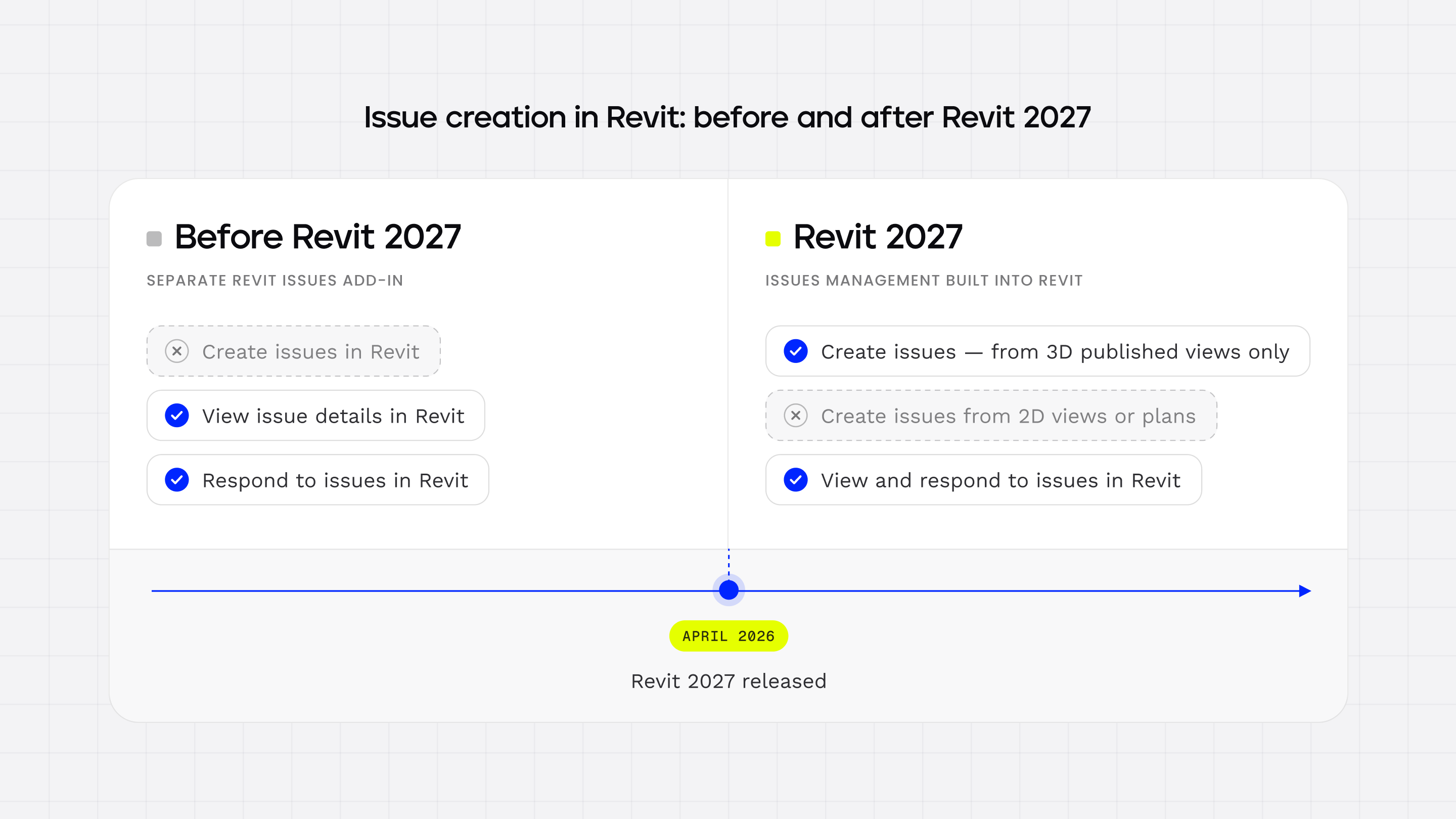
Until Revit 2027, users needed a separate Revit Issues Add-in to bring those cloud-based issues into Revit. The add-in allows users to view issue details, respond to issues, and see their locations in the model. The Revit model also had to be available through Forma Data Management, formerly Autodesk Docs.
Released in April 2026, Revit 2027 changed that. Revit Issues Management is now built into Revit, so the separate add-in is no longer needed. Issues created in Forma Design Collaboration can be viewed directly in Revit in both 2D and 3D, with issue information synchronized between Revit and the cloud. Revit 2027 also lets users create issues right within Revit. But there is still one limitation. New issues can currently be created only from 3D published views. So despite the fact that Autodesk now has native issue management inside Revit, it still relies on the wider Autodesk cloud environment for the project and issue data.
When Autodesk Issues is the right choice
Autodesk Issues is particularly useful in the following scenarios:
- The team already works in ACC/Forma. If the project model is already in Autodesk’s cloud, there is no need to set up another system for issue management. The team can keep its models, issues, permissions and project information in the same place.
- People outside the Revit team need to work with issues. Architects, engineers, contractors, site teams and subcontractors can all take part in issue management without working directly in Revit. This is useful when several disciplines and project participants need to follow and respond to the same issues.
- The project already uses Autodesk Construction Cloud for coordination. If ACC/Forma is already the main place where the project is coordinated, adding another tool just for model comments may create unnecessary duplication. Thus, keeping issues in Autodesk can be simpler in this case.
Where Autodesk Issues has limitations (especially for small teams)
Autodesk Issues is a mature solution but some of its requirements and limitations can matter for smaller Revit-focused teams.
- The model needs to be in the cloud. Autodesk Issues requires the Revit model to be available in Forma Data Management (formerly known as Autodesk Docs). You can’t simply open a local Revit model and start using Issues Management without connecting it to Autodesk’s cloud environment.
- Issue creation in Revit is still limited. Earlier versions of the Revit Issues Add-in mainly let users view and respond to issues created through Autodesk’s cloud workflow. In 2022, an Autodesk Revit Ideas user asked for the ability to create issues directly from Revit. Revit 2027 partially addresses that request by bringing issue creation into Revit. Yet, new issues can currently be created only from 3D published views. Creating an issue directly from a 2D view or plan is still not possible, which can be a significant limitation for MEP and electrical teams that work primarily in plans. This remains one of the main gaps in Revit 2027’s native issue creation, since many coordination issues are flagged while reviewing plans rather than 3D views.
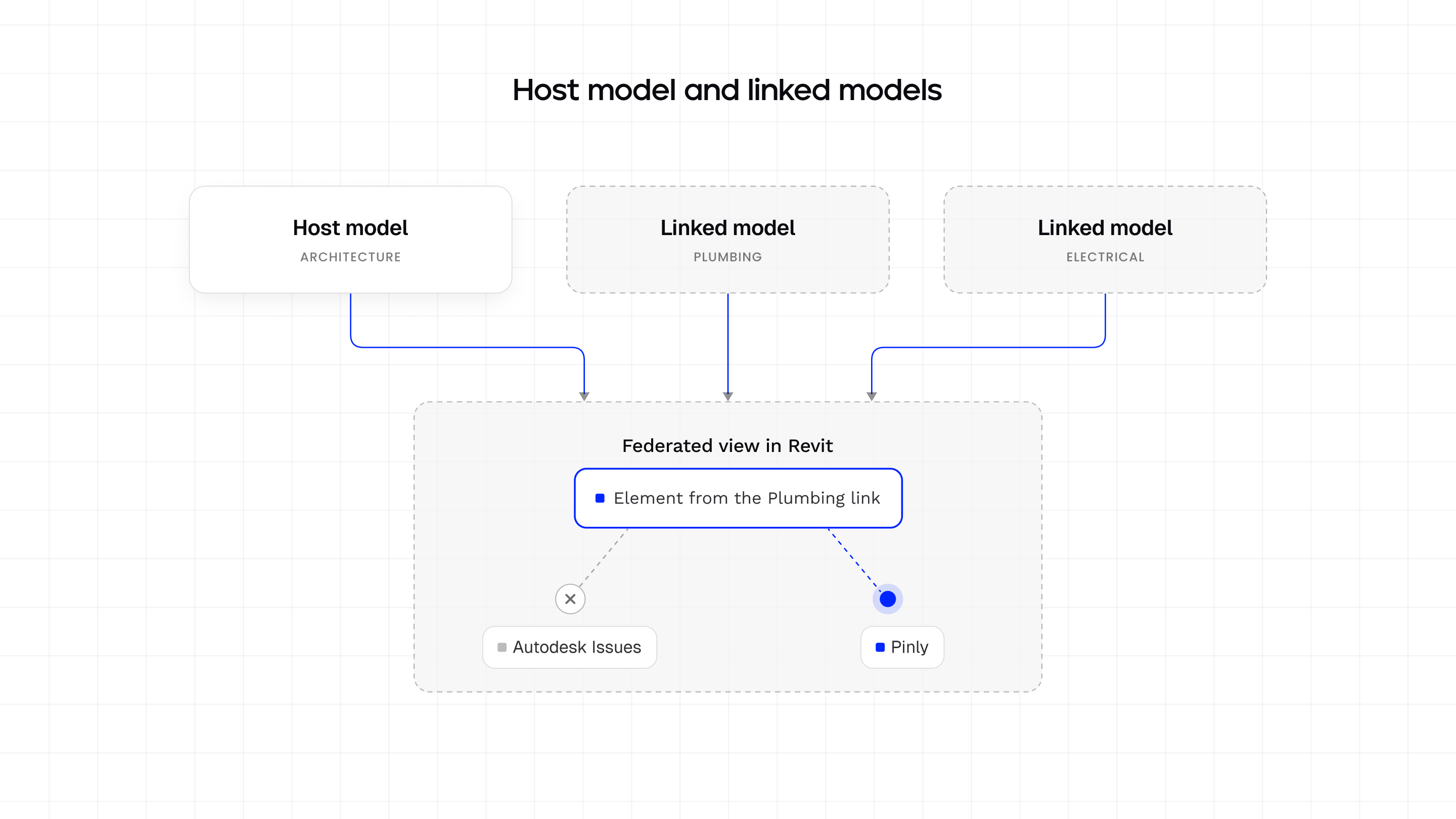
- Comments don’t carry over to linked Revit files. Projects are commonly split into separate linked models by discipline with different contractors working in their own files before everything is merged into a federated model. Autodesk Issues currently can’t place comments on elements that belong to a linked file; comments only attach to elements in the host model.
- Issue locations depend on published views. Autodesk Issues ties issue locations to published or uploaded views. When the model or its views change, those published views may need to be updated or republished to keep issue locations accurate. This can include extra work when existing issues need to be re-tagged after model changes.
- Cross-model coordination and issue grouping have limitations. Revit 2027 supports associating issues with different models for multidisciplinary coordination, yet managing issues across several models depends on the project’s associated-model structure. Grouping and tracking related issues across disciplines can therefore require additional manual work. It’s worth noting that this “associated models” setup is a project-level ACC/Forma feature for linking separate models together for coordination purposes — a different concept from standard Revit file links, where models such as architecture, plumbing, and electrical are linked directly inside Revit.
- AI automation for Issues is limited. Autodesk introduced a built-in Revit 2027 MCP Server that enables AI clients to query the model, inspect element parameters, and work with model data. However, it doesn’t provide a documented MCP workflow for creating or managing Autodesk Issues through an AI agent. The Forma Issues API supports issue creation, updates, comments, statuses, and attachments but placement issues tied to locations on drawings or models are read-only through the API. This limits what an external AI agent can automate when working with spatial issue locations.
Choosing an alternative to Autodesk Issues: key selection criteria
If a small Revit team is considering other Revit plugins and add-ins as alternatives to Autodesk Issues, these five questions can help narrow down the options:
1. Where does the comment live? An issue can be tied to a cloud project, a published view or a specific model element. The choice matters when the model changes. For instance, comments linked to published views may require additional maintenance, whereas comments tied directly to model elements can stay connected to the same element as the model develops.
2. Does the tool require the Revit model to be in the cloud? Some tools require the Revit model to be available in ACC/Forma while others let teams work with a local model. For a small team without an existing cloud-based coordination workflow, being able to keep the model local can make a huge difference to setup and everyday work.
3. Can users create issues directly in Revit? With some tools, Revit users can view and respond to issues created elsewhere. Others allow them to create and manage issues directly in Revit. If issue creation is part of daily modeling and coordination, being able to flag problems without leaving Revit can be an important consideration.
4. Does the workflow support 2D views and plans? A 3D-only creation workflow may be sufficient for some coordination tasks. Yet, teams that review problems primarily in floor plans, sections or other 2D views may need broader view support. Thus, make sure to check if issues can be created and managed in the views the team uses for coordination.
5. Can an AI agent work with issues? If the team wants to automate repetitive issue-management tasks, check whether the tool provides an API or an AI agent BIM or Model Context Protocol (MCP) interface that can work with issues.
Autodesk Issues alternatives comparison
Before we cover each tool in greater detail, here’s a quick look at how Autodesk Issues compares with the other options.
| Tool | Where the comment lives | Cloud model required | AI/automation | Pricing | Onboarding effort |
|---|---|---|---|---|---|
| Autodesk Issues | ACC/Forma Cloud (tied to Published Views; linked files not supported) | Yes (mandatory ACC/Forma Docs) | Revit 2027 MCP; placement issues are read-only through the Issues API | Quote-based | Medium |
| Pinly | Directly on model elements inside Revit, including linked files | No (works with local or cloud-hosted models) | Open MCP server: AI-assisted comment creation, replies, and batch resolution | Free for 1 seat and 3 active projects; $10/seat/mo for Pro; Custom for Enterprise | Low (simple Revit plugin installation without cloud setup) |
| BIMcollab | BIMcollab project and BCF issues, accessible through Revit and other BIM applications | No (exchange via BCF files or BCF Managers) | No native MCP/AI | From ~$14/user/mo for Basic, ~$21 for Advanced, ~$28 for Enterprise (billed annually; min 10 seats) | Medium |
| Dalux BIM Viewer | Dalux Cloud (BIM Viewer and Field) | Yes (uploaded to Dalux Cloud) | No AI agent workflows | Free (limited to 3 active projects/buildings; unlimited users) | Low |
| Revizto | Cloud; 2D sheets and 3D models in a single environment | Yes | Provides an MCP server for custom AI/LLM integration | Quote-based (3 custom tiers) | Medium/high |
| Custom Revit workflows | Depends on the custom implementation | Depends on the team’s requirements | AI/MCP automation, if developed by the team | Free software core; initial custom dev: $30-150k + 15-25%/yr maintenance | High (requires dedicated programming skills and ongoing support) |
Top 5 alternatives to Autodesk Issues
Autodesk Issues is not the only option for managing comments and coordination issues. Below, we have outlined five alternatives and grouped them by the type of coordination they are best suited to support.
Revit-native commenting
These tools are suitable for teams that want to create and review issues directly in Revit without adopting a separate multidisciplinary coordination platform.
Pinly is particularly relevant for teams that want Revit-native commenting without setting up Autodesk’s Issues Management specifically. This includes teams that keep Revit models locally, as well as teams whose models already live in Autodesk’s cloud environment, including those still on older BIM 360 projects, where Issues Management isn’t available at all.
1. Pinly
Pinly is a Revit collaboration tool that lets teams add and manage comments directly on their model without moving the Revit model into ACC/Forma. The solution’s workflow supports commenting in both 2D views and the model, keeps comment locations tied to model coordinates and provides built-in grouping and progress tracking for issue sets.
Pros
- Local-model workflow
- 2D and 3D commenting
- Built-in issue grouping and progress tracking
- Commenting on elements in linked Revit files
- MCP-based AI issue management
Cons
- Limited fit for project-wide coordination with participants outside the Revit workflow
Pricing: highly accessible entry point (free tier for 1 seat and up to 3 active projects; Pro at $10/seat/month; Enterprise custom pricing)
Best fit: small to medium Revit teams that need structured model feedback and issue tracking without making ACC/Forma a requirement.
Open issue exchange without a CDE change
Open issue standards are important when project participants work in different BIM applications and need a common issue format without moving everyone into the same authoring environment. BIMcollab is a strong example that uses BCF to exchange issues across applications such as Revit, Archicad, Tekla, Navisworks, and Solibri.
2. BIMcollab
BIMcollab delivers an issue-management platform that is built around the open BCF standard, with integrations for major BIM applications. It provides a structured way to create, exchange, comment on, assign and resolve issues across different software environments.
Pros
- OpenBIM interoperability
- Issue filtering and prioritization
- Due dates and project milestones
- Power BI reporting integration
Cons
- Separate issue-management platform
- Greater workflow overhead than lightweight Revit commenting
Pricing: basic plan from ~$14/user/month when billed annually, with a 10-user minimum to get started; advanced from ~$21/user/month and Enterprise from ~$28/user/month
Best fit: multidisciplinary teams exchanging issues between Revit, Archicad, Tekla, Navisworks and other BIM applications.
Free project-wide coordination
A free project-wide option can be useful when many participants need access to BIM information and issues but the project doesn’t need another paid coordination platform. Dalux is a good example, with its free BIM Viewer and broader range of construction management tools.
3. Dalux
Dalux provides BIM viewing, model review, issue management, and construction-focused collaboration, with its free BIM Viewer offering a low-cost starting point for project teams.
Pros
- Free access for the whole project team
- Native BIM, IFC, and drawing support
- Desktop and mobile access
- Revit, Navisworks, Tekla, and ArchiCAD plugins
Cons
- Paid-feature dependency for more advanced coordination
- Models and drawings need to be uploaded to Dalux
Pricing: free (note: free use is limited to 3 different and active projects or buildings)
Best fit: projects that need broad stakeholder access to BIM information and basic issue workflows at little or no initial cost.
Multidisciplinary coordination and clash detection
Dedicated coordination platforms become relevant when the requirement includes federated models, clash detection, 2D/3D review and structured issue management. Revizto is particularly strong in this category because clash results and manually created issues can be managed within the same coordination environment.
4. Revizto
Revizto is a multidisciplinary BIM coordination software platform that combines 2D and 3D model review, issue management and clash detection. The tool supports configurable issue workflows and automation, which enables teams to standardize how issues are created, assigned, tracked and resolved across a project.
Pros
- Automated clash-to-issue workflows
- 2D and 3D issue locations
- Configurable issue workflows
Cons
- Pricing and licensing complexity
- Broader feature set than needed (for some teams)
Pricing: quote-based
Best fit: Multidisciplinary projects where clash detection, model coordination, and structured issue resolution are core requirements.
Note: we recently covered where Revizto works well and where its alternatives may be a better choice in a separate blog post.
Custom solution
When off-the-shelf tools don’t cover a company’s specific requirements, a custom Revit solution can provide more control over how issues are created, organized, and automated. Tools such as pyRevit and Dynamo can be used to build custom processes inside Revit and MCP can add AI-driven automation. The trade-off is the time and cost required for development, deployment, and ongoing maintenance.
5. pyRevit, Dynamo and custom MCP solutions
pyRevit, Dynamo, and custom MCP solutions can be used to build issue-management and automation workflows around Revit. pyRevit provides development tools inside Revit, Dynamo supports visual programming for custom Revit processes, and MCP can connect AI assistants with Revit and related project data.
Pros
- Custom issue management workflows
- Automation around firm-specific standards
- Direct control over Revit-based processes
Cons
- Development expertise requirements
- Revit version maintenance
- Custom development costs
Pricing: pyRevit and Dynamo are available at no additional software cost. Yet, custom Revit issue management solutions can require a significant development budget. Based on our internal research, initial development can cost around $30,000-$150,000, with ongoing support and maintenance adding approximately 15-25% per year.
Best for: teams with development resources that need issue management or AI automation built around specific Revit workflows, standards, and coordination requirements.
Pinly vs Autodesk Issues: how the two tools differ
We’ve now looked at five alternatives to Autodesk Issues. Let’s focus on Pinly vs Autodesk Issues and compare how they differ.
For a small to medium Revit team whose coordination happens mainly inside Revit, Pinly covers the core needs. With it, a team can comment directly on model elements, work with issues in both 2D and 3D, manage statuses, group issues, and keep the Revit model local without setting up an ACC/Forma cloud workflow. This works whether the model is local or already hosted in Autodesk’s cloud, without needing to set up Autodesk’s Issues Management specifically. Plus, its model-based comment locations stay tied to the model coordinates as the project develops.
When issue management extends beyond Revit, Autodesk Issues offers a broader environment. Architects, engineers, contractors, subcontractors, site teams and other participants can work with the same project issues without opening Revit. Besides, ACC/Forma provides tools for managing models, permissions, assignments, and project information, which makes Autodesk a more suitable option for multidisciplinary and organization-wide coordination.
There is also a difference in how the two tools support AI-assisted issue management.
Autodesk provides a Revit 2027 MCP Server for AI-assisted model queries and automation but its documented capabilities do not currently provide an MCP workflow for creating, grouping, and resolving Issues.
Pinly’s MCP capabilities are built around an open MCP interface, which allows an AI agent to find clashes, place grouped pins, add descriptions and resolve them through natural-language requests.
In short:
- Autodesk Issues is better suited to project-wide issue management across multidisciplinary teams and the wider Autodesk cloud environment
- Pinly is more relevant to Revit-focused teams that want lightweight model-based issue management, including linked files, without setting up Autodesk’s Issues Management specifically, plus an open AI/MCP workflow.
| Comparison point | Pinly | Autodesk Issues |
|---|---|---|
| Main workflow | Comments live directly on model elements, inside Revit | Issues live in ACC/Forma and sync into Revit through Revit 2027’s built-in Issues Management |
| Autodesk Issues Management setup required | No — works with local or cloud-hosted Revit models | Yes — the model must be in Forma Data Management (formerly Autodesk Docs) |
| Issue creation in 2D / 3D | Both, directly in Revit | Revit 2027 only, and only from 3D published views; 2D/plan creation isn’t available yet |
| Comments on linked-model elements | Supported — comments can be placed on elements inside linked Revit files | Not supported in the scenario we tested; comments attach to the host model only |
| Participants outside Revit | Limited — built around the Revit team’s workflow | Yes — architects, engineers, contractors and site teams can work with issues without opening Revit |
Bottom line: who should use what
Here’s a quick summary of where each option works best.
- Stay with Autodesk Issues if you already work in ACC/Forma, coordinate across disciplines, and involve contractors, subcontractors, site teams, or other participants outside Revit.
- Try Pinly if you work primarily in Revit and need issues to stay attached to model elements, including elements in linked files, rather than published views. It doesn’t require setting up Autodesk’s Issues Management specifically, whether your model is local, cloud-workshared, or already hosted in ACC/Forma.
- Use BIMcollab for open BCF-based issue exchange across different BIM applications while keeping your existing CDE.
- Pick Dalux for a free project-wide environment for sharing BIM models and drawings with a large group of users, particularly on site-oriented projects.
- Go with Revizto for multidisciplinary coordination that combines 2D/3D issue management, clash detection and workflow automation.
- Build a custom solution when you need highly specific Revit automation or AI-driven capabilities that ready-made tools do not provide and if you have the resources to support ongoing development and maintenance.
No matter which tool you decide to go with, you’ll be better off if you get in touch with the plugin provider and test the workflow with a real project before making a final decision. This is the best way to see how the tool fits your Revit setup, team, and coordination process.
FAQ
What is the difference between Pinly and Autodesk Issues?
Pinly is a Revit-focused commenting tool that works with local models and keeps issues tied to model elements, including 2D and 3D views. It works whether the Revit model is local or already hosted in Autodesk’s cloud.
Autodesk Issues is part of the broader Autodesk ecosystem and is designed for cloud-based coordination through ACC/BIM Collaborate Pro and Forma.
In simple terms, Pinly focuses on Revit-level commenting while Autodesk Issues provides project-wide issue tracking software for multidisciplinary coordination.
Can you create an issue directly from Revit in Autodesk Issues?
Yes. With Revit 2027, Revit Issues Management became part of the core product, so users can create Revit 2027 issues directly from Revit.
There is one important limitation, though: issue creation is currently available only from 3D views. Issues cannot yet be created directly from 2D views or plans, which can be restrictive for MEP and electrical teams.
What happened to Issues Management in Revit 2027?
In Revit 2027, Revit Issues Management moved from a separate add-in into the Revit product itself. Issues from Forma Design Collaboration can now be viewed in both 2D and 3D inside Revit, plus users can create issues from 3D published views. The change makes Autodesk’s issue workflow more integrated, although 2D issue creation is still unavailable.
Does Pinly require an ACC or Forma subscription?
No. Pinly works with Revit models whether they are kept locally or already hosted in ACC/Forma, so there’s no need to set up Autodesk’s Issues Management specifically just to create and manage comments. That makes the workflow useful for teams that need lightweight Revit collaboration without adopting a dedicated issue-management setup — including teams on older BIM 360 projects, where Issues Management isn’t available at all.
Can Pinly comment on elements in linked Revit files?
Yes. Pinly supports placing comments directly on elements that belong to linked Revit files, not just the host model. This matters on projects split into separate discipline models, such as architecture, plumbing, and electrical, where different contractors work in their own files before everything is merged. Autodesk Issues doesn’t currently support placing comments on elements in linked files.
Does Pinly replace Autodesk Construction Cloud?
No. Pinly addresses Revit-level commenting and issue management. It doesn’t replace the broader project coordination capabilities of Autodesk Construction Cloud.
For multidisciplinary coordination involving contractors, site teams, subcontractors, or other participants outside the Revit workflow, ACC/Forma remains the more suitable environment for managing project-wide issues.
CEO & Co-founder
Ilia Ivanov is a BIM and AEC software development expert with over 10 years of experience. He specializes in Autodesk Revit, BIM automation, and custom software development for the AEC industry. Ilia shares practical insights on the Revit API, AI-powered engineering workflows, and building tools that help design teams work more efficiently.