How to keep track of BIM issues when your firm won’t pay for ACC

CEO & Co-founder
Published
Updated

TL;DR
When companies don’t invest in dedicated BIM issue tracking software like Autodesk Construction Cloud (ACC, now part of Autodesk Forma), project teams have to use scattered tools to document model issues. This article compares six free and low-cost BIM issue tracking options, including Excel issue logs, Navisworks viewpoints and clash tests, BIMcollab BCF Manager, Dalux BIM Viewer, custom pyRevit or Dynamo scripts, and Pinly. It also helps teams select the right approach based on their project requirements, including the need for comments linked to model elements and collaboration across team members.
Why tracking BIM issues without dedicated software is difficult
Without Autodesk Construction Cloud (ACC) or other dedicated BIM issue tracking software, project teams may have to document model issues across several applications. For example, a coordinator might save Revit comments and findings as screenshots in PowerPoint, record Navisworks clash detection notes in an NWF file and write technical decisions in a physical notebook.
When issue information is scattered across different tools, several problems can arise:
- Unspecified ownership – project problems get documented without a designated person assigned to resolve them.
- Status gaps – coordinators spend extra effort checking multiple files or asking colleagues whether an item remains open, under review or finished.
- Lost model context – snapshots and written notes sometimes fail to identify exact element parameters, which turns finding geometry updates into a puzzle without a proper BCF file/BCF Manager setup.
- Redundant effort – identical defects end up logged in several locations, which forces staff to execute manual duplicates across different files.
The need for accessible alternatives also comes up in discussions on r/bim, where professionals look for free issue tracking solutions when their companies are unwilling to pay for dedicated platforms. For teams in this situation, the challenge is finding a practical way to manage coordination issues without adding a costly software subscription.
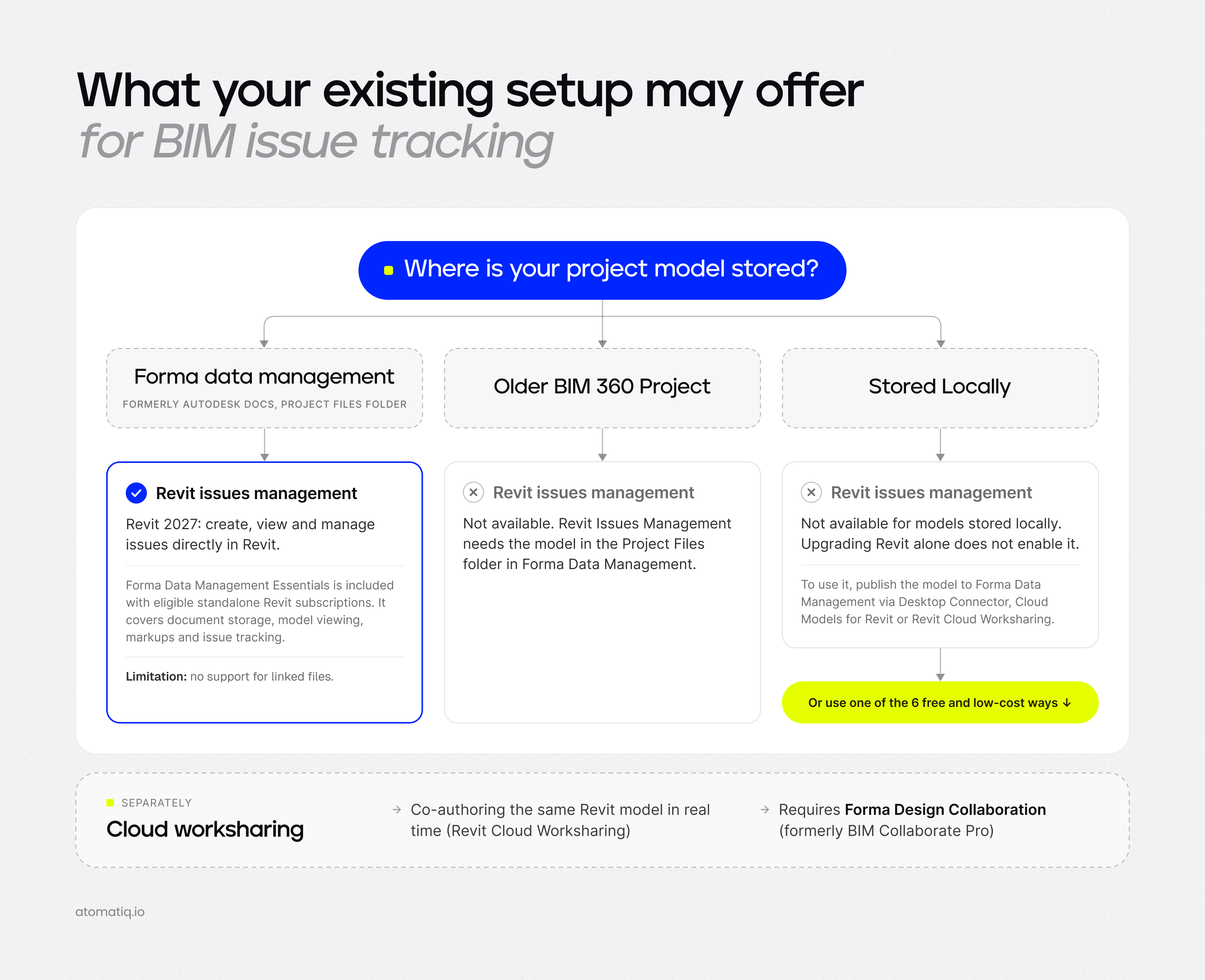
What your existing setup may offer for BIM issue tracking
Not having a dedicated BIM issue tracking platform does not necessarily mean that you need to purchase another product. Depending on the software your company already uses, you may have access to built-in features for documenting and managing model issues. So, before assembling a free toolkit or exploring the best Revit plugins and add-ins, it is worth checking which capabilities are already available in your existing setup.
For instance, Revit 2027 introduced integrated Autodesk Issues/Revit Issues Management, which lets users create and manage model issues directly in Revit. However, this feature requires the project model to be stored in Forma Data Management (formerly Autodesk Docs). Upgrading Revit alone does not enable Issues Management for models stored locally.
Besides, eligible standalone Revit subscriptions include Forma Data Management Essentials, which provides document storage, model viewing, markups and issue tracking at no additional cost . For more extensive document management and project collaboration features, the full Forma Data Management subscription starts at $45 per user per month, or $540 per year at that rate.
Cloud worksharing and legacy project limitations
1. Cloud worksharing. A standard Revit subscription does not include Revit Cloud Worksharing that allows multiple users to edit the same model simultaneously in the cloud. The capability requires Forma Design Collaboration, formerly known as BIM Collaborate Pro. Local files and other worksharing setups have different requirements.
2. Legacy BIM 360 projects. Older BIM 360 projects are still supported by the Revit and Navisworks Issues add-ins. Teams can continue working with BIM 360 issues in their authoring applications, provided they have the required project permissions. However, these projects do not support the newer Revit Issues Management workflow available for ACC projects.
The key takeaway is this: before investing in a separate toolkit, review the issue tracking features and cloud services available through your existing setup. You may already have access to some of the capabilities you need, although cloud worksharing requires an additional subscription and older BIM 360 projects rely on the legacy issue-tracking workflow.
BIM issue tracking tool comparison
Before we start exploring the six BIM issue tracking tools and approaches in greater detail, we suggest that you take a look at the table below for a quick overview of their key features and differences.
| Option | Where the issue lives | What is free | Team sharing | Tied to the model element | Works inside Revit |
|---|---|---|---|---|---|
| Excel issue log | Spreadsheet on a shared drive | Everything | Yes, via shared files | Element IDs and screenshots entered manually | No |
| Navisworks viewpoints and clashes | NWF project file | Only if Navisworks is already licensed | Yes, by sharing project files | Viewpoint and clash result | No, SwitchBack returns users to Revit |
| BIMcollab BCF Manager, offline | BCF files or BIMcollab cloud | Free plugin and offline BCF exchange | Yes, via BCF files; cloud sync requires a plan | Viewpoint and highlighted elements | Yes, via add-in |
| Dalux BIM Viewer | Dalux cloud | Up to 3 active projects/buildings | Yes, via a shared project | Comment on the uploaded model | Yes, via upload plugin |
| Self-built with pyRevit or Dynamo | Depends on the implementation | Open-source tools and custom scripts | Custom setups (shared drives/databases) | Depends on the build | Yes, runs natively |
| Pinly | Pinly server, separate from the RVT file | Up to 3 active projects per person, view comments in any project you are invited to | Yes, in real time, via project invitations | Yes, on the element, 2D and 3D, linked files included | Yes, plugin |
Note: we’ve also compared Autodesk Issues vs Pinly in our recent blog post, alongside other options such as BIMcollab, Dalux, Revizto and custom Revit solutions, to help you find the right issue tracking approach for your project.
6 free and low-cost ways to track BIM issues
Below, we compare six free and low-cost BIM issue tracking options, outlining what’s free, where each approach falls short and which project type it suits best.
1. Excel issue log
A shared Excel spreadsheet is the simplest option for project coordinators who need a central issue register without buying additional software. With it, a coordinator can create a table with columns for model, view, element ID, screenshot, assignee, status and date, then share it through the company’s existing file storage.
What’s free: the workflow requires no additional BIM-specific software if the company already has access to Excel or a compatible spreadsheet application.
Where it falls short: the spreadsheet is separate from the model. Users must manually capture screenshots, enter element IDs, update statuses and notify their colleagues. Plus, screenshots and element references can become outdated after model revisions.
Best for: small projects, occasional design reviews and projects with a limited number of issues.
2. Navisworks viewpoints and clash tests
If Navisworks is already part of your workflow, you can use saved viewpoints to document coordination findings and store them in an NWF project file.
Viewpoints preserve the camera position, visible geometry and annotations needed to revisit an issue. Plus, the SwitchBack feature lets users navigate from a selected object in Navisworks to the corresponding object in Revit.
What’s free: there is no additional issue tracking subscription if you already have the required Navisworks license. Viewpoints and saved coordination files are part of the existing workflow.
Where it falls short: viewpoints do not provide a complete shared issue management system on their own. Teams still need a process for assigning responsibility, updating statuses and recording decisions. Furthermore, clash tests require Navisworks Manage, which includes Clash Detective; a Navisworks Simulate license does not provide the same functionality.
Best for: BIM professionals who already use Navisworks for model coordination and need a low-cost way to document findings without introducing another platform.
3. BIMcollab BCF Manager
BIMcollab BCF Manager is a free plugin for Revit, Navisworks, Archicad, Tekla Structures and other supported BIM applications. The tool lets users create, edit, import and export issues directly within their authoring environment. Issues can include viewpoints, screenshots, component references, comments, assignees and status information.
What’s free: the plugin supports an offline workflow in which users create issues and exchange them through BCF files. No paid BIMcollab cloud project is required for file-based exchange.
Where it falls short: offline exchange relies on users exporting files, sharing them, importing updates, and keeping track of the latest version. For a shared online workflow, teams can connect BCF Manager to a BIMcollab project and synchronize their issues manually. The Basic plan starts at €12.50 (≈$14-$15) per user per month with annual billing, while the Advanced plan costs €18.75 (≈$22) and the Enterprise plan €25 (≈$29) per user per month.
Best for: users working across different BIM applications who need a standards-based way to exchange model issues without immediately paying for a full-featured BIM coordination platform.
4. Dalux BIM Viewer
Dalux BIM Viewer is a free cloud-based model viewer with built-in collaboration features. Its plugins support Revit, Navisworks, Tekla, Archicad and other applications, which enables users to upload and combine models and drawings for shared review. Users can create comments, assign responsibility, track status changes and import clash tests from Navisworks or Solibri.
What’s free: BIM Viewer includes model viewing, comments, issue tracking and the associated plugins. Dalux’s free-use terms permit up to three active projects or buildings, with unlimited invited users.
Where it falls short: models and drawings are uploaded to Dalux’s cloud environment, so the workflow requires cloud-based project data. Plus, companies managing more than three active projects or buildings must review their licensing options or work within the free-use limit.
Best for: projects involving multiple stakeholders, especially when clients, consultants and other participants need model access without individual paid seats.
5. Custom tools built with pyRevit or Dynamo
BIM managers and Revit automation specialists can build small project-specific tools using pyRevit or Dynamo. For example, they could create a command that collects element IDs, captures model information, exports findings and generates a structured issue report.
What’s free: pyRevit is an open-source framework and Dynamo is available as part of the Revit ecosystem, which means that you can develop your own scripts without purchasing a dedicated issue tracking platform.
Where it falls short: building an automated report is not the same as maintaining a shared issue tracker. Features such as assignments, status history, notifications and synchronization across users require additional development effort. Developers must also test and maintain custom scripts as Revit versions and project requirements change.
Best for: BIM managers and technically skilled specialists who have recurring workflows, access to development resources and a specific need that existing tools do not cover.
6. Pinly
You can try Pinly, a Revit plugin that lets users attach comments directly to model elements and discuss design feedback in threaded conversations. The tool supports model-based comments in both 2D and 3D views, including elements in linked files. Collaboration data is stored on Pinly’s servers, so comments do not add data to the RVT project file itself.
What’s free: the Free plan supports up to 3 active projects per user. Pinly also lets users view and follow comments in other projects where they have been invited, even when those projects exceed their own active-project limit.
Where it falls short: Pinly currently supports Revit only, so it does not provide a shared issue workflow across Navisworks, Archicad or other BIM applications. Users who need additional active projects or broader access can consider the Pro plan, which removes the active-project limit and includes unlimited team seats, currently listed at €9 (≈$10) per seat per month or €7.50 (≈$9) per seat per month with annual billing.
Best for: Revit-focused teams that want contextual comments and issue discussions inside their models without adopting a full BIM coordination platform.
Bottom line: which option fits your workflow?
Here’s a quick summary of which BIM issue tracking solution may suit your project best.
- Try Excel if you work alone and need a simple list to record issues, assignees, and statuses.
- Make use of Navisworks if your company already has a license and needs saved viewpoints and clash tests for coordination.
- Choose BIMcollab BCF Manager if you exchange issue data with colleagues working in Archicad, Tekla, or other BIM applications.
- Opt for Dalux BIM Viewer if the project involves multiple stakeholders, including people without Revit access, who need to view models and share comments.
- Consider Pinly if your team works primarily in Revit and needs comments attached to specific model elements.
Importantly, before committing to a solution, we recommend that you get in touch with the tool provider to confirm current pricing, licensing limits, supported workflows and compatibility with your team’s software versions.
FAQ
Is there a free way to track BIM issues?
Yes. Free BIM issue tracking is possible with an Excel spreadsheet, saved Navisworks viewpoints or free tools such as BIMcollab BCF Manager, Dalux BIM Viewer and Pinly Free.
Each option has different capabilities and limitations, so the right choice depends on your existing software, project size, and whether you need cross-platform issue exchange or comments linked directly to model elements.
Do Autodesk Issues add-ins work without a Forma Data Management subscription?
No. Autodesk Issues add-ins require access to a supported cloud project hosted on Forma Data Management (formerly Autodesk Docs) or another compatible Autodesk platform. Without access to the project’s cloud environment, you cannot use the add-ins to view, create, or update issues.
Is BIMcollab BCF Manager free?
Yes. BIMcollab BCF Manager is a free plugin for Revit, Navisworks and other supported BIM applications. It lets users create, edit and exchange issues through BCF files without a paid subscription.
However, for cloud-based issue sharing and synchronization, you need a BIMcollab subscription. The Basic plan starts at €12.50 per user per month with annual billing.
How many users can I invite to Dalux BIM Viewer for free?
There is no fixed user limit. Dalux BIM Viewer lets you invite unlimited users for free to a project, including external stakeholders who need to view models and share comments.
Yet, keep in mind that the free plan is limited to 3 active projects or buildings per company.
Can I track BIM issues in Excel?
Yes. An Excel issue log can include model and view names, element IDs, screenshots, assignees, dates, and statuses. It is a practical starting point for small teams, although updates and coordination remain manual and issues are not automatically connected to the model.
Does Pinly have a free plan?
Yes. Pinly offers a free plan for its Revit plugin, supporting up to three active projects per user and one seat.
CEO & Co-founder
Ilia Ivanov is a BIM and AEC software development expert with over 10 years of experience. He specializes in Autodesk Revit, BIM automation, and custom software development for the AEC industry. Ilia shares practical insights on the Revit API, AI-powered engineering workflows, and building tools that help design teams work more efficiently.